Category Archives: blog

Microsoft Learning spoofs “I love the whole world”

Early last year, the Discovery Channel launched a very popular television advertisement called “I love the whole world“. The theme of the ad is an original song based on the camping song, “I Love the Mountains”. If you haven’t seen it, or would like to watch it again because it’s so awesome, here it is for reference.

As it turns out, “I love the whole world” can be adapted into many uses. Microsoft’s education and certification division, Microsoft Learning, took a stab at making a parody for itself. The video is officially described as “customers, partners, and Microsoft employees share what they love about learning.” More accurately, “geeks breaks into a song and dance.”

And because this was so awesome, here is another parody made with Halo 3.

Now I’m tempted to make a version in Left 4 Dead. Ideas welcome.

Songsmith plus black metal, hilarity ensues

Songsmith is a very powerful tool, and likewise, with great power comes great responsibility. This is an example of using Songsmith responsibly.

A contestant on an Austrian “Idol” television program chose to sing “The Brimstone Gate”, a heavy metal song. Regardless of your opinion on heavy metal, it’s probably not something you should sing without accompaniment. Which is why one user decided to test the tolerances of Songsmith’s vocal detection engine and generate an accompaniment for him. The result is a Benny Hill inspired musical you just have to hear to believe. The timing is just spot on.

In case you were wondering what the original sounded like, without the uplifiting accompaniment, click through if you dare.

Windows 7 marketing initiative outlined

windows7There’s great marketing campaigns, like 5.5 million views of a blender blending things on YouTube, and then there was “the wow starts now“. A job posting published today looking for a marketing manager to be responsible for the Windows 7 marketing campaign gives us some insights into how Microsoft plans to pitch the new kid of the block.

Take a leadership role on the team that will bring Windows 7 to market. Be a part of the launch and sustain marketing for one of Microsoft’s most important products – Windows 7.

We are looking for an experienced marketer to help launch, develop and drive key consumer marketing programs for Windows 7. In this core product marketing role on the Windows 7 consumer marketing team you will lead a cross discipline v-team and develop and execute programs in alignment with the marketing strategy. Key components of the initiative include:

  • Capture the consumer’s imagination and spark desire for Windows 7
  • Build confidence in the Windows brand
  • Establish an understanding of the Windows 7 benefits
  • Spark positive recommendations for Windows 7
  • Deliver on the brand promise of compatibility

This specific role will lead three key aspects of Windows 7 launch and sustain marketing:

  • Develop, own end-to-end, and drive key marketing programs including an advocacy plan – a key pillar to our strategy
  • Establish the engine and rhythm for the consumer launch including project management across the 20 v-teams to insure accountability, consistency and world class marketing
  • Manage pre-release marketing

If you’ve ever wanted to influence how we bring a world class product like Windows 7 to market in the consumer space this is your chance.

Whilst most of the initiatives are pretty predictable, “deliver on the brand promise of compatibility” is likely to play a big part of the Windows 7 campaign, especially since compatibility was one of the biggest concerns (and also most misconceptions) that plagued Windows Vista.

Microsoft opens fake store to demo utopian retail experience; begs question why not open a real store

[flv:msretail.flv 600 330]

What would you do with 20,000 square foot (approx. 1,900 square meter) of real-estate? Would you make the most of it and build a store to sell something? Or would you build a fake store that looks like a real store, functions like a real store, but isn’t actually a store? I’ll give you some time to think about it while I tell you about what Microsoft did.

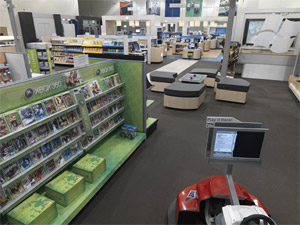
msstoreRumors of this mystical place has been floating around in the past year or so but just recently Microsoft has published extensive video and photos from the Microsoft Retail Experience Center as part of their vision for a technology-enabled retail experience. It is said the facility is a fully-functional store from real checkouts to a real loading dock, all but lacking one but important thing, real customers.

It’s great Microsoft has the skill to design, build and operate a “real” Microsoft store – which is what everyone has been asking for and doesn’t look half bad I must admit – but it’s a bit of a bummer there’s no apparent way for anyone in the general public to shop there. There’s no phone number, no address and even the emergency exits are painted with a faux-background representing a car-park.

I have just one simple question, if this store is as functional as Microsoft tout it to be, then why not build a car-park, some real doors and just call it “open for business”?

Until then, enjoy the pictures and this virtual Photosynth tour.

Windows 7 Problem Steps Recorder: miracle tool

[flv:psr.flv 600 420]

If you’ve ever offered technical support to other computer users, you might find yourself losing a slice of your sanity over their inability to describe the problem clearly. And most times it’s not the fault of the user, it’s just difficult to describe what you see with words. A feature new to Windows 7, called “Problem Steps Recorder” looks to be the missing tool for documenting where it all goes wrong.

What the tool is a simple but advanced variation of a screen capture software. Think of it as an automated “Print Screen” plus a little monkey in the background documenting all the mouse clicks, key strokes and gathers some technical reading material, who then ties up everything in a neat box and saves the results. The neat little box you get is a zipped MHTML report page which can be sent off directly to the help desk.

The report page is where this tool really shines. It actually is an XML page documenting each step of the user’s actions complete with a screenshot with the item highlighted. You can view the report as is, or as a slideshow, or even dig into the raw XML to expose greater detail like the X&Y coordinates of the mouse.

Here’s a report I prepared earlier for your viewing pleasure. You must use Internet Explorer to view MHTMLs.

To try the “Problem Steps Recorder” for yourself, type and select “psr.exe” in the Windows 7 start menu.

Hacking Microsoft Tag’s HCCB: works in monochrome too!

microsofttagphone

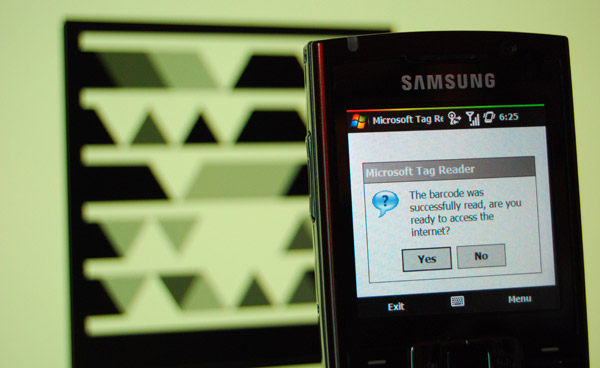
Microsoft Tags, technically known as High Capacity Color Barcodes, might not be so worthless in print after all. Following yesterday’s announcement at CES 2009, a lot of mostly criticism has arisen over Microsoft’s next-generation 2D barcodes, one of which was its dependency on color. However, my experiments prove it to be not as dependent as you think.

mstagexplain

On the surface, what appears to give HCCB’s its technical superiority is color, as the name might suggest. Using different colors, you could store 1 byte of data in less than half the space it would have taken a black-and-white matrix code. But, the secret is not color, at least not in the technical sense.

You see (pun), color is a combination of hue, saturation and brightness. What I’ve found is that the data is not stored in hue or saturation, but brightness alone. Having said that, there is a secondary dependency on color for the technology to work. If that doesn’t make sense, have a look at the following example.

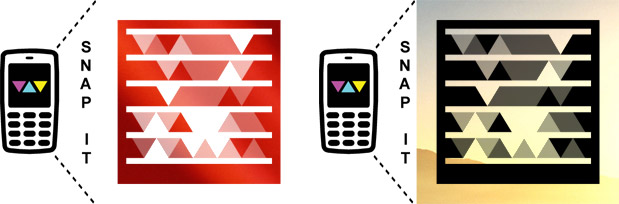
Here is a simple “Hello world” tag I’ve created. On the right, I used Photoshop’s black and white adjustments (settings R:100,Y:100,G:0,C:33,B:0,M:66) to strip out all the hue and saturation information to be left with an image purely composed by differences in brightness.

mstag_ex1

Now if you took your Tag Reader and tried to capture the black-and-white tag, it won’t work. I don’t know why, but it just wouldn’t. What comes next was stumbled upon by my luck. If you focus your camera on something else in the room, then back to the tag as quickly as possible, it will actually work. (If it doesn’t for you, you’re just going to have to trust me.)

The phenomenon stumbled me at first but soon became rather obvious. Every camera tries to take the perfect photo by automatically adjusting for color balance – the setting which either makes photos look warm or cool. By focusing the camera away, it changes the color balance to suit that area, and if you shift back the camera back really fast, it won’t have time to readjust the color balance and so it inaccurately tints the otherwise black-and-white tag with either a orange or blue hue.

With that in mind, it means that all you need is a single hue of color (monochrome) to make it work. Try these. It should work every time.

mstag_ex2

Sure, it still means that HCCBs don’t work in a pure black-and-white situation like a newspaper but I don’t think in this day and age single-color printing is too much to ask for.

Update: Even subtle gradients and photo-based backgrounds will work too.
mstag_ex3