Category Archives: blog

Microsoft Tag: Microsoft’s own 2D barcode

[flv:microsofttag.flv 584 328]

It just wouldn’t be right if Microsoft didn’t have its own barcode technology too, which is why today Microsoft Tag (Beta) was announced at CES 2009. Much like other 2D barcode technologies including the popular but underwhelming QR Code, Microsoft Tag allows data to be stored in a graphical bitmap using shapes and colors. But with a twist.

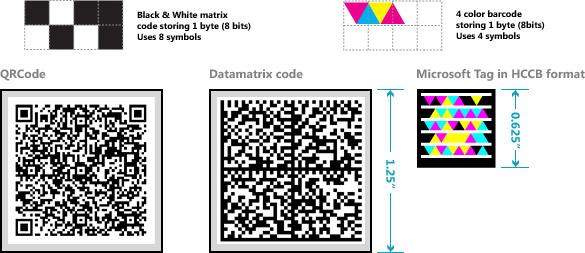
If you were to assume Microsoft Tag is just a clone of QR Code, you’d be wrong. In fact you should be ashamed of yourself for even thinking about it. Microsoft Tag is based on a whole new technology called High Capacity Color Barcodes (HCCBs), which was invented in-house by Microsoft Research. The difference is not using square pixels, but triangle shapes and colors to store data. The following diagrams show off its advantages.
mstagcompare

Unlike other tag technologies too, the Microsoft Tags don’t actually store the information. You see, all it stores is a unique ID which it then sends to Microsoft’s servers. This way, you can include much more information, and more variety of information, then if it was just on the tag itself. A nice side-effect of this is also the ability for publishers to gather reporting data on how many times it was seen.

To read these tags, Microsoft is making available today a downloadable application to a handful of mobile platforms including Windows Mobile, J2ME, iPhone, Blackberry, and Symbian S60 phones. A camera and internet connection is obviously required. To get the application, point your phone’s browser to http://gettag.mobi.

I’ve only played with Microsoft Tag for a few minutes on my Windows Mobile phone, but its a noticeably better experience than I’ve had with other 2D barcodes in the past. For example you can read it from a very far distance, from a very side angle and even if it’s partially blocked.

In addition, it wouldn’t just be a Microsoft platform without developer tools. That is why starting today the “tag maker” service is also available so anyone can create these tags. For the moment this is a free service, but out of beta, one could potentially see this is where Microsoft plans to make a buck.

I created a few tags of my own so you can try it out.
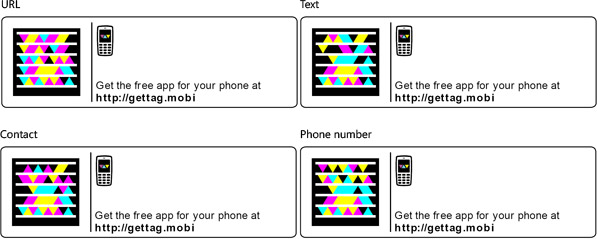
isstags

Update: Microsoft Tags work in monochrome too, unofficially.
Microsoft Research announces Songsmith, make-your-own-song-from-vocals software

songsmithui

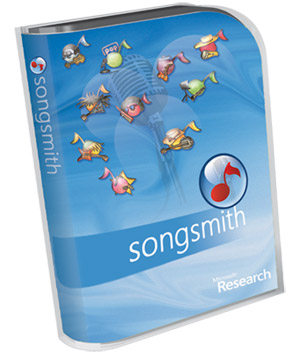
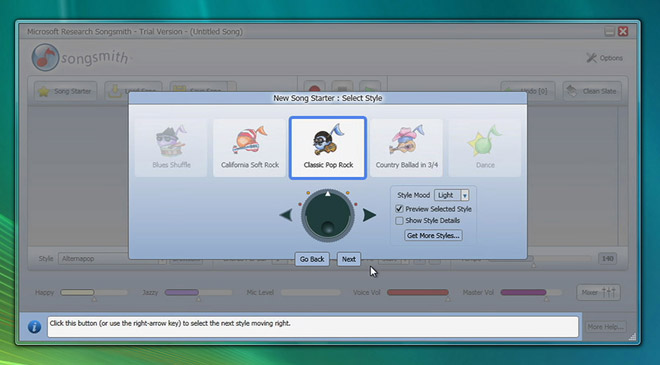
msrsongsmithThere was one thing left out of Microsoft’s CES 2009 keynote today and that was the announcement of Songsmith, by Microsoft Research.

Religious followers of this blog would know that Songsmith is the product of a Microsoft Research project with a student from the University of Washington called MySong which was showed off in early 2008. The software can automatically provide musical melodies to accompany any vocal singing you provide, making anyone audible a potential songwriter. Not that every teenager should be one.

Songsmith seems to have matured quite a bit from its early prototype days with new features such as “(allowing) you to expand your collection of musical styles and instruments through our partners, PG Music and Garritan” and “enables you to edit chords to create the perfect music accompaniment, even if you’ve never worked with chords before.”

As the second product to ship (first being AutoCollage) by the previously research-only-but-increasingly-commercial Microsoft Research (as the name suggests), Songsmith will only be available (soon) via the Microsoft Store as a digital download. A trial will also be available. Prices are not yet announced.

Update: The official Songsmith website is now up. So is the trial download link. The price for the full version if US$29.95.

World’s largest Windows Media Center remote control

If you thought you had too much free time, think again. Much to the frustration of many, remote controls have a tendency to feature very small buttons. So when “michbex” saw a super-sized Brookstone remote control at a shopping mall, he knew he had to do one better.

A true geek at heart, “michbex” and his partner-in-crime bought two Playstation 2 Dance Dance Revolution mats, a PS2-to-PC converter box, wrote a C# .NET library to interface with the mats and some more code to send appropriate keystrokes to Windows Media Center. (All of the source code is available from his site for download.) The result, is a Windows Media Center remote control fit for the Hulk.

To quote “michbex” himself, “What comes after multi-touch? Why not multi-step? Let’s see if this is the first STEP towards an incredible UX-paradigm-shift.” Classic.

Measuring up Windows 7’s new “super” taskbar

One of the most obvious changes you’ll see when you first boot into Windows 7 is the new taskbar dubbed the “superbar”. Most people like it, some don’t, but I think overall its a large improvement over that little strip of screen real estate which has not had a major renovation since Windows XP.

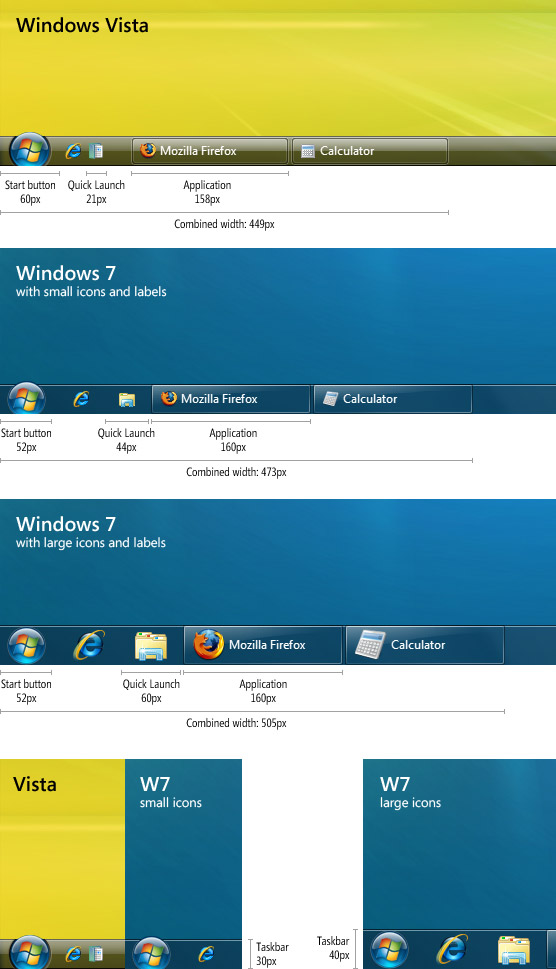
For some users, one hurdle of the new “superbar” is its enormous size, or so it appears. To set the record straight, I conducted a little side-by-side experiment with two quick-launch items and two active applications on both Vista and Windows 7. Together with a measuring tape in one hand and a magnifying glass in the other, I counted. Soon enough, I grew impatient and resorted to Photoshop instead. Here’s how they measured up.

w7superbarmeasure

In conclusion, some interesting findings. The Windows Start “pearl” button actually shrunk by about 8 pixels. Quick launch items are given more than twice the width and three times the width with Windows 7’s small and large icons respectively. Application buttons have relatively remain unchanged from Vista (and do not change in width with small icons), at the same time appearing much more elegant.

In summary, if you want a taskbar experience as close to Vista as possible in terms of real-estate, then enabling “small icons” will get you there. On the other hand, the default “large icons” won’t kill you either. In fact, if you don’t pin anything to the taskbar, then you’ll only lose 2 pixels per application whilst gaining 8 pixels from the Start button. What will you ever do with all those extra pixels.

The evolution of Windows Media Center

[flv:evolutionwmc.flv 640 480]

What does WebTV and Windows Media Center have in common? It’s all part of Microsoft’s plan to take over the world converge the PC with television, according to a recent history lesson published on Microsoft Videos. The 2-minute video revisits some “interesting” interfaces from WebTV and briefly shows off WMC in Windows 7 (nothing new if you’ve been keeping up with the leaks). How far we’ve come.

Watch Ballmer do Ballmer things live from CES 2009

ces2009

Another year, another my-TV-is-bigger-than-your-TV contest at the Consumer Electronics Show in Las Vegas. Breaking a 12-year old tradition, Steve Ballmer (not Bill Gates) will be kicking things off at the first keynote of the show which has been predominately owned by Microsoft. It’s no secret Windows 7 will be at the top of the agenda but Robbie Bach from Microsoft Entertainment & Devices is also scheduled to make an appearance which hints at some new consumer entertainment announcements. Speaking of which, the XBOX is due for an upgrade.

The keynote is “scheduled” to begin on Wednesday January 7 at 6.30pm PST (find out when that is in your local time here). You can play along at home with the official webstream in low (100k), medium (300k) and high quality (750k). Assuming Ballmer will be as animated as he usually is, you’ll want to grab the high quality to see him in his full glory.