
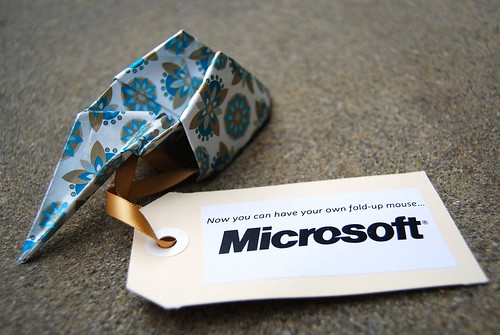
Look what they’re sending out as review units for the Microsoft Arc mouse. Just kidding. Cute eh.
Look what they’re sending out as review units for the Microsoft Arc mouse. Just kidding. Cute eh.
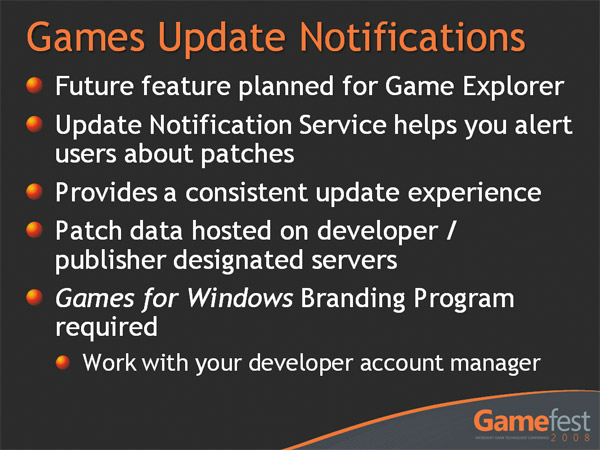
Here’s something for the heavy PC gamers among us. It’s true, digital distribution stores like Steam and EA Store has taken some of the guesswork out of managing game updates, but there’s still a lot of PC games out there where you don’t realize it’s out-of-date until you discover you’re 5 patches behind. Wouldn’t it be cool if Windows notified you of game patches like it does with system updates? Windows 7 might just do that.
A presentation about Windows Game Development at Microsoft’s annual game technology conference, Gamefest 2008, revealed plans that a games update notification system will be integrated into the “Games Explorer” feature of Windows.
Besides the details in the slide above, from what I can gather in the audio recording the feature will only notify users of game updates and point them to a URL defined by the publisher. It will not automatically download or install them like Windows Updates. There was also a prototype of the interface demoed during the presentation but video recordings are not available.
Personally as a pretty heavy PC gamer, I think this is a necessary and perhaps overdue feature in the operating system. Windows is already a really powerful gaming platform and the Vista “Games Explorer” was a step in the right direction.
 With Microsoft’s Professional Developers Conference (PDC) and Windows Hardware Engineering Conference (WinHEC) happening a week apart from each other in late October, there’s going to be an extraordinary amount of Windows 7 information communicated in such a short time.
A couple of months ago people began uncovering a bunch of Windows 7 related sessions published to the PDC 2008 agenda, and now more recently some Windows 7 sessions has appeared on the WinHEC 2008 sessions list too. Some interesting ones highlighted.
Connected PCs and Devices
- Audio Design for Unified Communications
- Building a Communication Device in Windows 7
- Building a Windows Certified Electronic Picture Frame
- Common Driver Installation Errors and How to Diagnose Them
- Design Considerations for Building a Windows Home Server
- Discussion: Windows Home Server
- PC and Device IDs in Windows 7: What You Need to Know
- Plug and Play Basics
- Printer Driver Development Tools and Print Verifier
- USB Technology Update and Windows Strategy
- Windows 7 Device Experience Overview
- Windows 7 Logo Program and Design Considerations for Network Infrastructure Devices
- Windows Connect Now for Wireless Devices
- Windows Logo for Network Media Devices and the Role of DLNA
- Windows SideShow: Building Better Devices and PCs
Core Platform & Fundamentals
- Distributing Drivers on Windows Update
- Leveraging Solid-State Drives in Windows
- Making Drivers Available on Windows
- Network Power Management Fundamentals
- New Developments in the Storage Platform
- System Integrated Flash Storage
- UEFI Industry Momentum: The AMD Perspective
- Windows 7 Power Management Overview
- Windows Logo Program Future Strategy
Enterprise Computing
- BitLocker: Protecting Portable Data in Windows
- Directions for Virtualized I/O in Windows
- IPv6: Deploying the Foundation for Tomorrow
- Microsoft Data Center Transformation
- New Windows Server Logo Requirements and Programs
- Server and Domain Isolation: The Next Generation for Network Security
- Understanding the Performance Cost of Power Optimizations
- Windows Presentation Virtualization
- Windows Server Power Management Overview
- Windows Virtualization and Cluster Shared Volumes
High Fidelity Graphics and Media
- DirectX: Core Graphics for Windows 7
- Discussion: Windows Media Center
- Display and Monitor Technologies
- Perspectives on the Windows TV Tuners Ecosystem
- Video Improvements in Windows 7
- Windows 7 Logo Program for TV Tuners and Remotes
- Working with the Windows 7 Graphics Architecture
Mobile Computing
- Connecting Projectors and Using Docking Stations with Windows 7
- Multi-touch Designing and Testing for Logo Compliance
- Multi-touch Driver Development
- Multi-touch in Windows 7 Overview
For the moment, WinHEC 2008 seems to have the leg up with more interesting Windows 7 content than PDC. However I’m sure both will balance out closer to the event when all the sessions have been finalized. Unfortunately for me, I can’t attend any of them due to exams *sigh*.
Whilst some may have unlocked the secret to the M.C. Escher Zune logo, most people are still left pondering “what the hell is that thing”. Besides the announcements today of the new models and features in the updated firmware, the Zune brand is also sporting at least 2 new logo animations which are worthwhile pointing out. There’s one at the beginning and end of these official “guide” videos.
Whilst I’m not sure if the animation is suppose to make it any easier to understand, but it’s sure pretty to look at. As an added bonus there’s also a cute chime in the background.
As some other people have suggested it would be pretty cool if this animation was used as the startup animation on the Zune at boot (not resume at standby though), sort of like the XBOX360 startup sequence, giving it a bit of extra flair.
 If you think Live Mesh is just about syncing some TPS reports across a couple of computers and maybe a mobile phone or two then you’re a very narrow-minded person.
Bit and pieces of information about what else Mesh can do has been scattered around various Channel9 videos like this one with Ori Amiga all the way back in April, but I wanted to see where they’re at now so I lurked around the Live Mesh booth last week at the Microsoft TechEd Australia conference.
Fortunately my good charms paid off when Angus Logan – Senior Technical Program Manager for Windows Live Platform – gave me a quick but satisfying peek into the world of applications running on the Live Mesh platform coming soon to both end-users and developers.
Please bear in mind any of the following is subject to change and your mileage may vary.
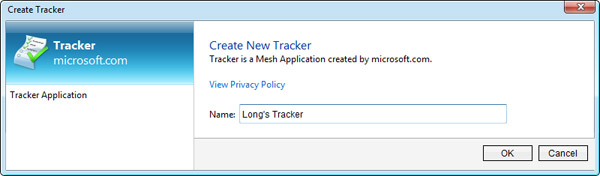
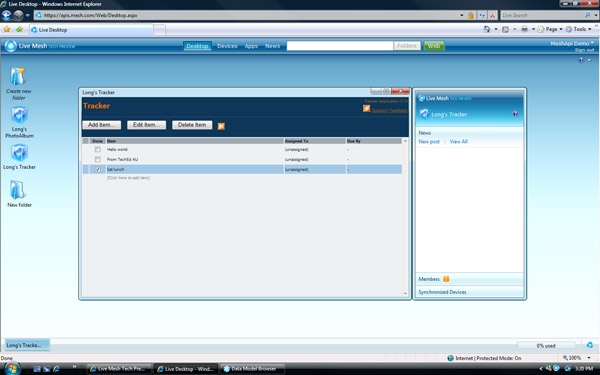
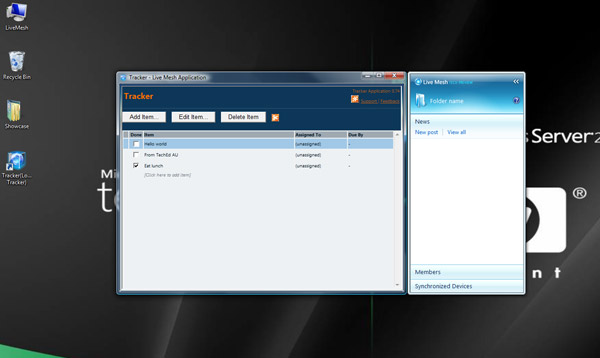
As you can see from the above screenshots, the same demo Mesh application “Tracker” – a simple to-do list app can be run from both the Mesh desktop in the browser and on the actual Windows desktop as a (sort of) real application. To achieve this run-everywhere application experience, the Mesh apps on the desktop actually run inside a chromeless Internet Explorer wrapper provided by the Mesh Operating Environment (version 0.9.3104.1 for those of you playing at home). Ignore the bug with the Mesh panel on the desktop thinking it’s a folder.
 Not only can you have the same application run in multiple devices and even just inside a web browser, it also syncs data across all devices autonomously thanks to the underlying Mesh framework. Furthermore even if the network is unavailable, due of the way Mesh manages data, the application’s data and the application itself will still be available with the latest version of the data it was able to sync.
Now obviously a to-do list application is a pretty straightforward example of where synchronicity might be useful, but imagine where this could go. Having heard some people talk about just how difficult it is to move a music library from one computer to another, imagine storing your entire music collection on Mesh and managing it with a Mesh application allowing you to enjoy and manipulate the same library and playlists across all devices wherever you are, even if you’re at a friends’ house with just a browser.
For the programming-minded amongst us who can’t wait to get their hands dirty, then keep your eyes locked on Microsoft’s Professional Developers Conference in late October where the Live Mesh SDK should be making an appearance.
 Either Microsoft is always severely understaffed or developers can’t stick around for more than one release cycle. Nevertheless the coolest and most under-appreciated product from Microsoft – Windows Home Server is looking for a software development engineer to work on a couple interesting features for the next major release. And there’s nothing better that recruits the brightest and the best than a job posting that teases like this one posted today.
On the heels of a tremendous reception by customers for version 1 of Windows Home Server, the team just released power pack 1 last week, and is beginning the planning of the next big release. To staff up a rock solid team for delivering the top notch UI for the next release, we are looking for a developer with a strong passion for slick UI. You would be responsible for designing and coding the very visible and highly confidential UI capabilities that we are adding to Windows Home Server. Just to give a couple of examples – Time Machine compete (sp?) UI for backup and restore, Windows Media Center integration UI, Live Mesh integration UI etc.. are three of the top UI deliverables for our next version. Yes, we are positioning ourselves as THE backup and Media Server within the home by this release. We do not take UI lightly and have assembled a team that will bring the concept of ‘servers’ into the home with rave reception by both analysts and consumers.
What’s more interesting is that they’re also looking for someone with “solid working experience in WPF & XAML, WinForms, and Win32” and “Silverlight application development experience is a plus”, indicating there might be some possibility these new user interfaces will be based off Windows Presentation Foundation for both the desktop application and browser management experience.
I don’t know about you but the next version of Windows Home Server is sounding pretty “rave” to me already.
Update: Not exactly sure what they mean by “Time Machine compete UI”. You could either interpret it as a “Time Machine-like UI” for backup and restore or “Time Machine integration UI” so WHS can integrate with Time Machine.
Update 2: From the looks of it what they mean is actually a “Time Machine like” user interface for browsing and restoring backups.