Category Archives: blog

Win $6000 of HP goodies in the Magic Giveaway: hold your horses, competition starts soon

How would you like to see six grands worth of state-of-the-art desktop computer, notebooks (not one but two), netbook, digital media receiver, multifunction printer, softwares and movie under your Christmas tree? Even if you don’t celebrate Christmas, I think this is as good a reason as any to accept presents. And did I mention you have fifty chances of winning?

So what does $6000 get you?

The competition starts soon and more details on how you can enter at this site will follow, but I just want to say for today I have the utmost respect for HP and Microsoft, who under less than ideal economic situations is going to make this holiday season a memorable one for at least 50 people, their friends and family.

Times like this I wish I could enter my own competition, but fortunately for everyone else you’re all eligible.

Flickr Search Connectr for Windows 7 Search Federation

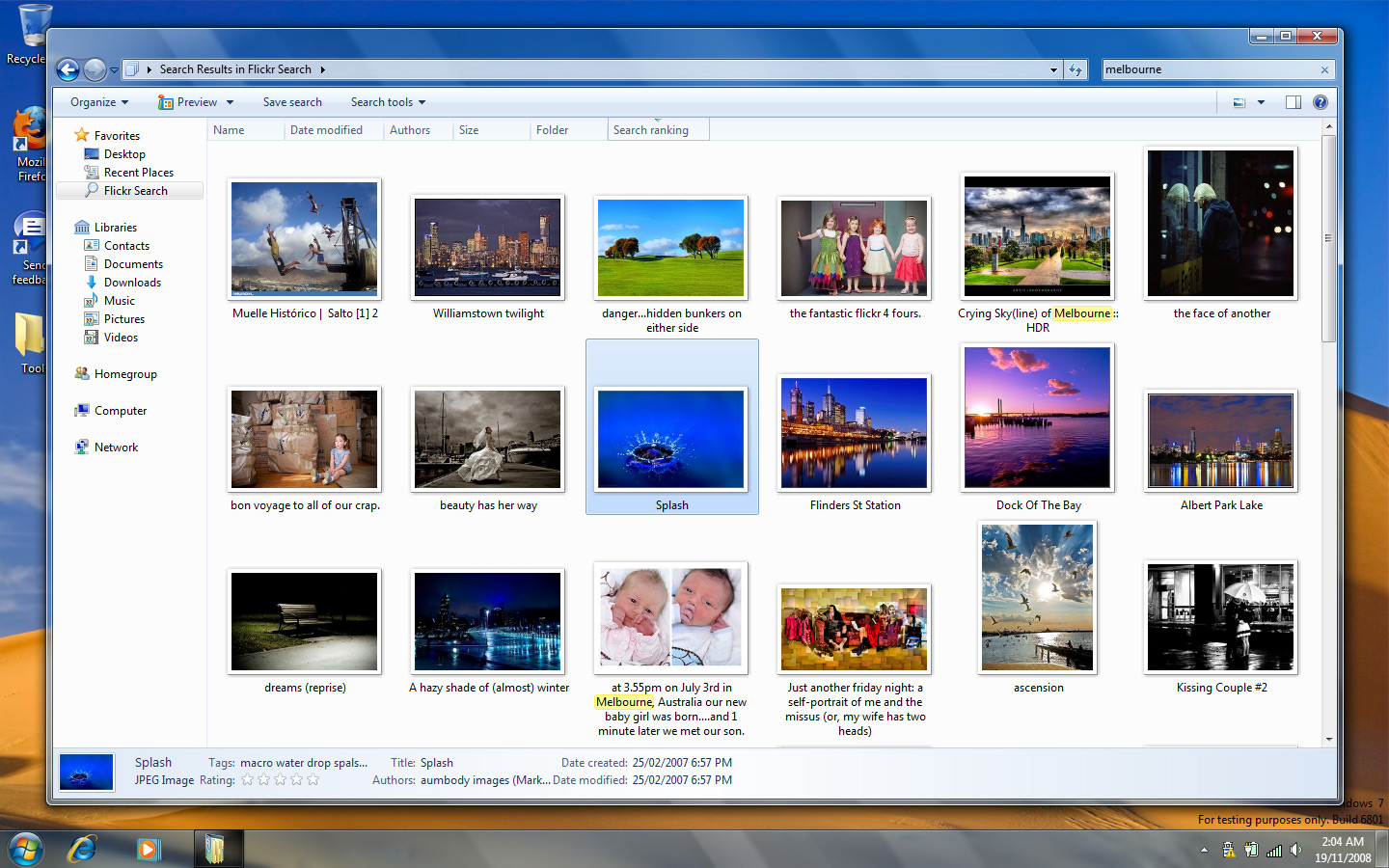
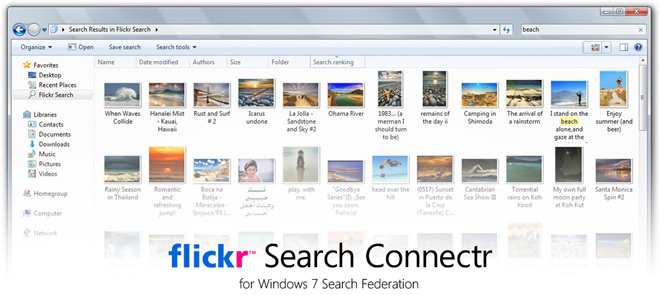
As I had promised yesterday in my little teaser, today (again at 2AM), I’m announcing the availability of “Flickr Search Connectr” for Windows 7. If you have a copy of Windows 7 and the tubes aren’t blocked, I encourage you to try it for yourself.

So what is this voodoo you might be asking? Well this is actually a combination of two components, both carefully put together in a couple of hours by amateur programmer yours truly. The first is an OpenSearch Description File generator (also known as the “Search Connector” in Windows 7) and the second is a Flickr web service. Combined, they allow you to search and access images on Flickr right in the Windows 7 Explorer using the new “Search Federation” platform.

Please note, because I’ve implemented a man-in-the-middle solution, it carries obvious performance penalties and as such please be patient when waiting for the results to load.

What federated search is about is the ability to search remote file repositories on the local network or web. In Windows 7, this feature is implemented natively in the shell. And because Microsoft is the evil monopoly it is, it’s implemented using open standards OpenSearch and RSS2 so it’s simple for developers to take advantage of.

As a theory as to why not many people are excited about this, the example Microsoft used to promote this feature (on their website and at PDC08) was searching an online Sharepoint server. Practical, but not cool at all. It may be an enterprise feature by design, but I think it has legs as a consumer feature too which is why I built this Flickr as a proof-of-concept.

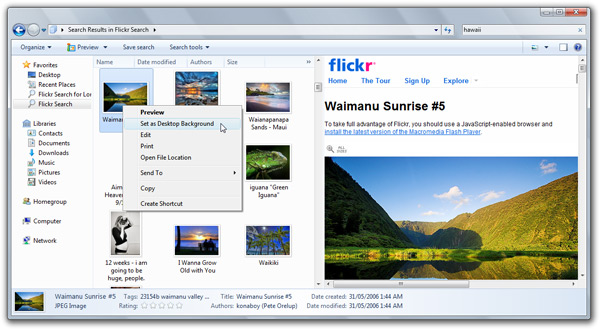
If you want to know what makes searching within the shell cool, it means you’re interacting directly with the file. It’s a little clunky in the M3 Build 6801, but even still you can double click a picture to open it in larger view or set it as your background.

Now imagine the possibilities. Searching the files on your remote Windows Home Server, searching your documents on Google Docs, finding music on Pandora, finding videos on YouTube, finding PDFs from your library. Basically anywhere with a repository of files.

I look forward to the full MSDN documentation (no documentation now) to outline what this platform can do. Also can’t wait to see what other and more talented programmer can mash-up and most of all, which first parties will be first (pun) to support this powerful platform.

Windows 7: seek and you shall find

Here’s a bit of fun. Take a good look at this screenshot to find out why I’m excited about the new find and organize features in Windows 7. See if you can figure out what makes this special and why there’s tremendous opportunities here for developers and end-users. More detail in the next couple of days. (P.S. Flickr API is fun.)

Delicious new Windows Live Wave 3 icons

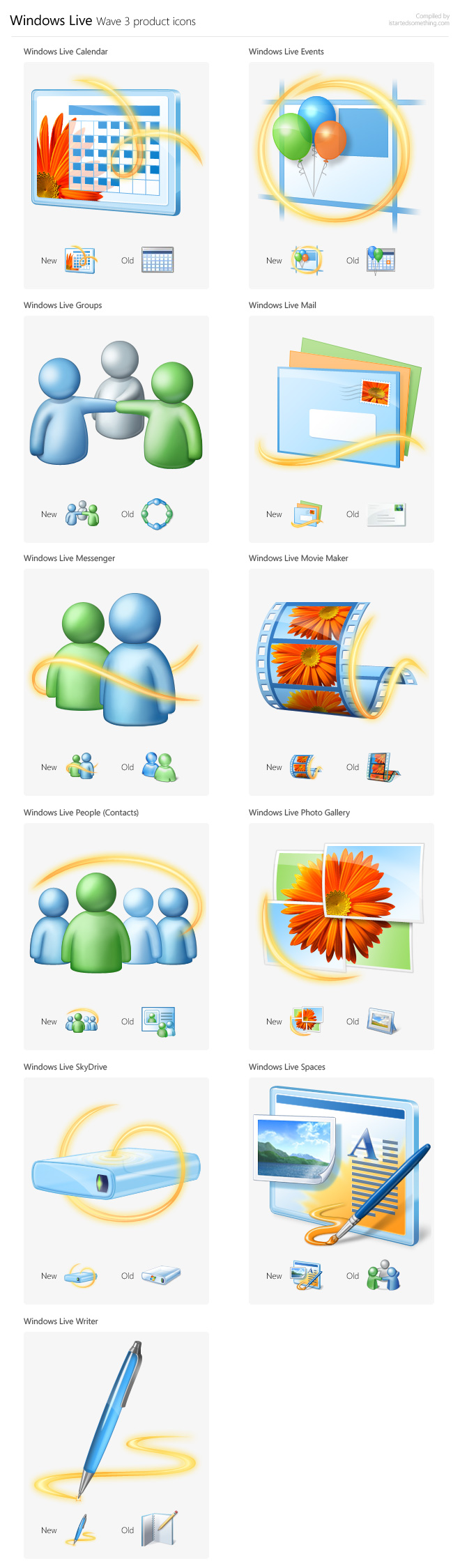
Yes, the rumors are true, I have a fetish for icons. Earlier this week, Microsoft’s Steve Clayton teased us with a small thumbnail of the new Windows Live Wave 3 product icons and since then I’ve made it a quest of mine to showcase them in their original high-resolution glory. With the help of Windows Live community manager Marcus Schmidt, my quest is complete and my icon hunting skill points have doubled. Here they are for your visual indulgence.

Windows Live Wave 3 icons

My favorite would have to be the simplistic yet iconic (pun) Live Photo Gallery icon, and least favorite the Live Spaces icon which is overly complex.

Windows 7’s new “play all” decoders, encoders and transcoding capabilities

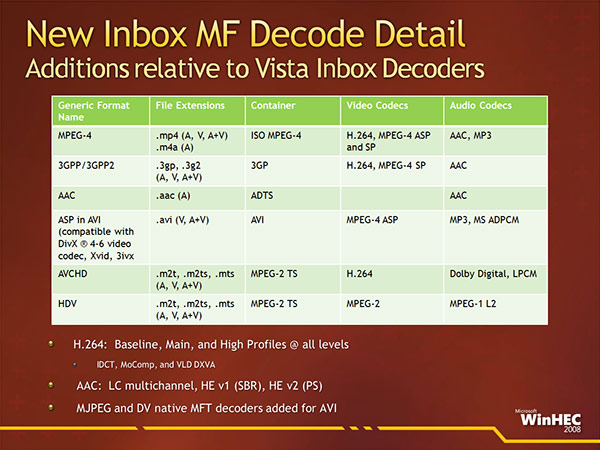
If you have had any theories Microsoft was conspiring with the media conglomerates to protect their interests and not the user’s, throw them in the bin, pour jet fuel and remotely detonate them since Microsoft can’t be any bolder than building in DivX and Xvid native support in Windows 7. Yes, all your favorite Family Guy episodes will play in Windows Media Player. Yes I’m looking at you. You may have also heard there’s native H.264 and AAC support. But that’s not all. After all, decoding is only one part of the equation.

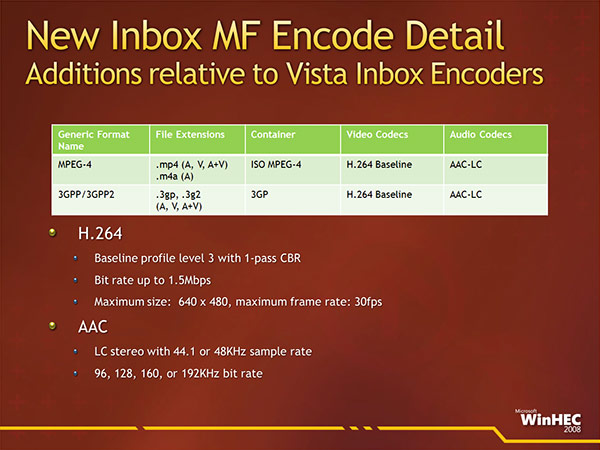
In a presentation titled “Video Improvements In Windows 7” at WinHEC 2008, Microsoft also revealed new encoding and similarly transcoding capabilities in Windows 7. The new “Media Foundation” decoders are as follows,

In Windows 7, encoding is extended to widely adopted MPEG-4 and 3GPP standards with H.264 video and AAC audio encoders built in, on top of the WMV, WMA and MP3 encoders built-in to Vista today – after all, hardly anyone uses Windows Media outside of the Microsoft ecosystem. Speaking of which the Zune even supports H.264 and AAC natively.

Bear in mind however these encoders are not a replacement for commercial alternatives. The limitations include simple profiles, maximum bitrate and resolutions.

With this new pool of decoders and encoders, Microsoft’s also doing some building in some interesting transcoding (decoding and re-encoding from one format to another) technology in Windows. From what I can at least gather from the presentation, transcoding is actually built right into the Windows 7 shell. That is, if you drag and drop a video from your desktop to your portable media player, the conversion will happen automatically. Personally, anything that removes unnecessary third-party bloatware to add content to portable devices gets my vote.

Microsoft also recognizes that software transcoding is less than ideal – a movie will usually take hours, so Windows 7 will also support a new breed of dedicated hardware transcoders which could ideally become a standard motherboard chipset feature. Here’s a particular one from Quartics.

Touch panning (a.k.a. kinetic scrolling) in Windows 7

[flv:win7panning.mp4 640 410]

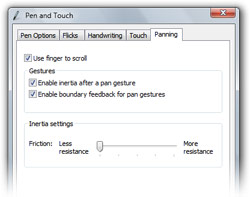
If you’re particularly fond of the kinetic scrolling functionality that is implemented on the iPhone and Zune 3.0, then you have to get your hands dirty on Windows 7 since kinetic scrolling is now operating-system wide. The feature, officially implemented as “Panning”, was one of the many secrets unearthed by Rafael Rivera and can only be used if touch capability is detected.

The above demo was recorded on a Toshiba Portege M750 Tablet PC which is a tablet/touch convertible. A more in-depth review on that soon.

What this feature does (in build 6801) is allow you to use your fingers to “pan” or scroll any element with a scrollbar. The obvious examples include the start menu, Notepad and the help files. At the time of writing, browser windows including both IE and Firefox are not compatible which I assume is because the browsers implement their own scrolling behavior (ie. smoothscroll). And just like most other kinetic scrolling implementations, if you reach the barriers abruptly it’ll move the entire window as if you were pulling on it. There is also some inertia so content keeps scrolling if you swipe your finger.

If you’re looking to buy a notebook in the not too distant future to support Windows 7, bear in mind some of the cool touch and tablet functionality that will be enabled and decide if you want to touch your trackpad or your screen.

Update: Yes, I did use Aero Shake in the demo, very cool indeed.