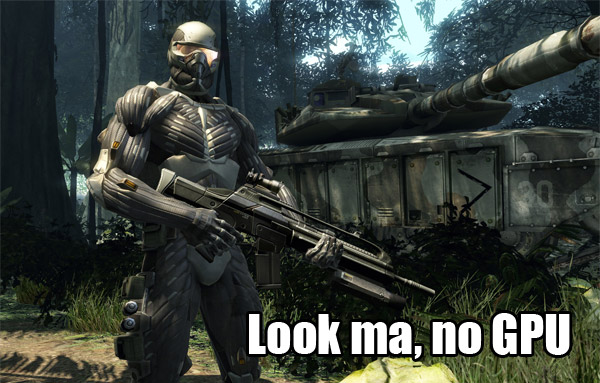
Direct3D backwards compatibility has always been “you get what your graphics cards run”. For example, Crysis may be a Direct3D 10 game, but if you only have a Direct3D 9-level graphics card, it might only make your jaws open instead of hitting the floor. But that’s all going to change comes Windows 7.
Simply put, in Windows 7, you will experience the same graphics fidelity and detail whether you have a Direct3D 9-level graphics card or even no graphics card. The magic fairy dust which makes this possible is called Direct3D 10Level9 and Direct3D WARP10 respectively.
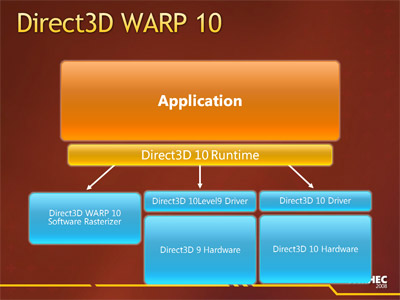 Direct3D 10Level9 is exactly what the name describes, it allows you to run Direct3D 10 applications on Direct3D 9 hardware with the same visual output but at the cost of performance penalties compared to running on native Direct3D 10 hardware. On the other hand, if your graphics functionality or partially or wholly non-existent either by design (I’m looking at you Intel) or due to anomalies (graphics driver), that’s where WARP10 comes into play.
WARP which stands for Windows Advanced Rasterization Platform is a complete implementation of Direct3D 10 in software form – that is using only the CPU. It’s even capable of anti-aliasing up to 8xMSAA and anisotropic filtering. What’s amazing is that it is parity with the output of a native Direct3D 10 device. The MSDN article describes “the majority of the images appear almost identical between hardware and WARP10, where small differences sometimes occur we find they are within the tolerances defined by the Direct3D 10 specification.”
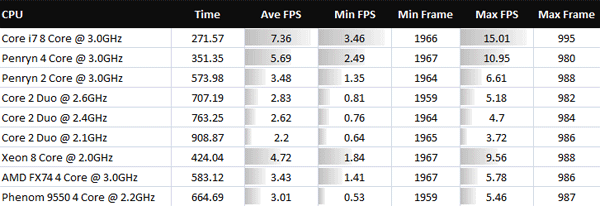
The question every one of us is asking is of course, so how well does it run. And the MSDN article answers with no other than our good friend Crysis. So this is the benchmark results of WARP10 running 800×600 with lowest quality settings.
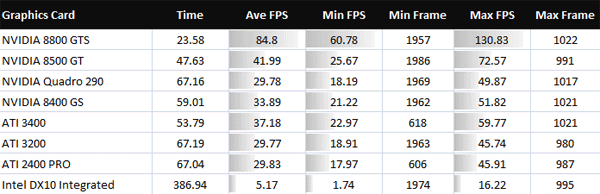
And compared to graphics cards…
Now before you laugh so hard you cry, remember in the WARP10 scenario the CPU is not only rendering the game now but also continuing to process everything else that it originally had to process with a graphics card. Taking that into consideration, I applaud it for even running at all. Remember this is Crysis.
If you’re gamer, obviously this is not plausible and the developers agree. “We don’t see WARP10 as a replacement for graphics hardware, particularly as reasonably performing low end Direct3D 10 discrete hardware is now available for under $25. The goal of WARP10 was to allow applications to target Direct3D 10 level hardware without having significantly different code paths or testing requirements when running on hardware or when running in software.”
Personally, I’m just glad the DirectX team is taking a positive turn for Direct3D backwards compatibility. Instead of just plainly not supporting older hardware, offering some alternatives to achieve the same visual result,.which after all the goal of Direct3D. Now who’s up for some Crysis slideshows?
Update: This should once and for all end the debate, “but can it run Crysis?” Yes. Everything can.
Update 2: Some examples outside of hardcore FPS games where this might be useful include: 3D CAD applications, casual games, simulations, debugging 3D applications and medical applications.
 Windows Azure is a new “Operating System” that Microsoft announced at PDC. They are marketing it as an “Operating System for the cloud”, but what does this really mean? To understand what Azure is and how it is different from Windows Vista you need to know a bit of background on recent computing trends.
 Today, the
 Now seems to be an awfully good time to be a student. If the