Category Archives: blog

Lo and behold, the Internet Explorer 8 toolbar.

First, a few words about the following screenshot. To be perfectly clear, this is not an original image. The window and its contents (address bar, tab, window title, page content) have been heavily recomposited to better fit in a smaller image size as well as to obscure any traces where this might have come from. I did not take the screenshot nor do I have access to the beta (so no emails please but do send bribes regardless). Having said that, I can easily vouch for its authenticity.
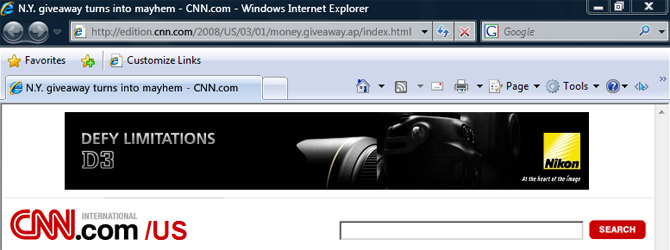
Internet Explorer 8 toolbar

It appears Internet Explorer 8 doesn’t stray far from the new hybrid menu/toolbar interface of Internet Explore 7, not in Beta 1 at least. Contrary to the ribbon-interface speculation, I think after the rather drastic transition from IE6 to IE7, a more consistent user interface is a good thing as users won’t waste any time relearning how to use a browser.

From top to bottom, the address bar now boasts a new UI trick being able to highlight just the domain in the URL. It’s a very insignificant change but its something that you wish you had thought of. It’s a smart thing to do because it dramatically decreases the risk from domain phishing attacks – where it convinces you to click on “paypal.com” actually taking you to “paypal.com.maliciouswebsite.com”.

The search box now sports the ability to display an icon for the search provider you have currently selected. Currently in IE7, it only displays the name of the search provider in italics which unfortunately means as soon as you type something, it removes any indication of which search you’re using unless you manually click the drop-down button. Glad that’s fixed.

The bookmarks menu makes a much welcomed return above the tabs having endured a year of seclusion inside the side-pane. You can now bookmark links to always appear on this menu bar and I might add is no longer separated by an ugly black line, as well as access to all your other bookmarks accessible from the “Favorites” button.

Last but not least, the whole toolbar has received a very subtle color change. Those who were a fan of #C5DEFA will now have to face up to #C1D5ED. Tough love.
Over to you, Chris.

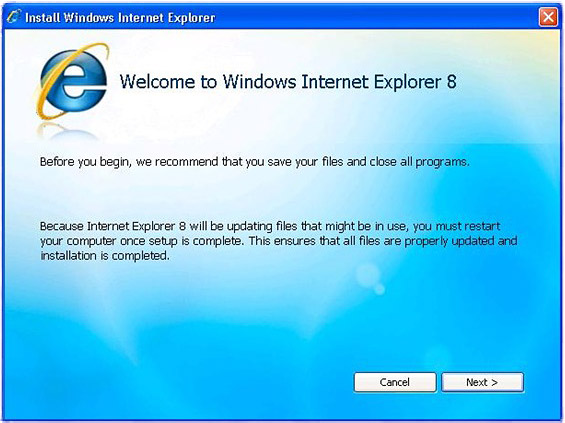
Lo and behold, the Internet Explorer 8 install screen.

Internet Explorer 8 install

It is so hard to get high-resolution lossless screenshots of unreleased software these days. In the meantime, this extremely compressed JPEG of the Internet Explorer 8 installation window will have to do. This is apparently what beta testers will be getting in the first release, as (super excited) Mithun Dhar kindly shows showed us.

The only difference between this screen and the previous IE7 Beta install experience is in fact just the number. That means either someone was smart enough not to reinvent the wheel, or just lazy. Meanwhile this good new for Windows XP users because it looks like Internet Explorer 8 will still be supported.

Unless that’s one convincing retrospective Windows Vista visual style.

MySong, from Microsoft Research, makes your singing sound a lot better than it really does

Microsoft Research MySongCue Scoble tears. This is one hell of a technology from Microsoft Research that I think will have a huge impact on how amateurs and hobbyists write music. The technology and software prototype is called MySong.

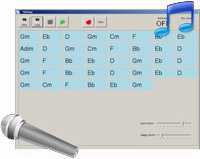
In a nutshell, the software records your singing (preferably in tune) through a microphone, and it systematically generates an instrumental accompaniment for your song. The quality is even comparable with a professional accompanist, not to mention the cost and time involved.

If you don’t believe me, have a look at this quick 5-minute demo with loads of practical examples.

[flv:MySongCHI2008.flv 630 420]

The technology was developed by Ian Simon from University of Washington in collaboration with Dan Morris and Summit Basu from Microsoft Research. They’ve published all of their research and methods in a paper (PDF) of the same name to present at the CHI Conference 2008 in a couple of months in Italy.

Without getting into too much detail, the technology uses the Hidden Markov statistical model which has been ‘trained’ by preprocessing a database of nearly 300 musical lead sheets. The sheets come from a variety of sources, genres and popularity to give a broad set of melody and chord sequence combinations. When it comes to the end user, it uses this abundance of data to find chord sequences which work best for each segment of melody. Presumably that means more ‘training’ can be done to improve the output even more.

The paper also points out “there is not a single correct accompaniment for a particular melody; chord selection will vary among musicians and genres, and a single musician may recognize many appropriate chord sequences for a single melody.” As a result, the software also gives the end user some room for creative adjustments in the form of “jazz factor” and “happy factor”. Both of which have a reasonable effect on the resulting accompaniment as demonstrated in the video.

If that wasn’t enough already, the researchers sought reviews from 30 independent musicians asking them to rate the different accompaniments produced by three different systems from one vocal input. They compared the result of MySong with hand-crafted chords and as well as Band-In-A-Box, the “state-of-the-art” commercially available software which they recognize to be the only automatic accompaniment generation system.

Here is just one example of the twelve they’ve ranked. I’ll leave you to judge for yourself.

Original input [flv:mysong/input.8.mp3 300 0]
MySong [flv:mysong/song.8.0.mp3 300 0]
Band-In-A-Box [flv:mysong/song.8.1.mp3 300 0]
Hand-crafted [flv:mysong/song.8.2.mp3 300 0]

Like many cool technologies at Microsoft, this remains still a research project. Whilst there’s no written indication of a commercial product as a result of the technology, but I don’t see why they wouldn’t or even just release the software as is.

As for future work, they say “additional development will focus on improving and diversifying the audio generated by MySong; the system is already able to supply chords interactively to a pattern based arrangement tool, which results in compelling audio output. Several study participants indicated that MySong would be of significant value for learning music theory; we are thus excited about exploring educational applications of this technology.”

TED video: Microsoft Research’s WorldWide Telescope

To my surprise, the TED conference organizers has swiftly uploaded the presentation recording from Microsoft’s announcement of their WorldWide Telescope technology showcased no more than 12 hours ago, when in contrast, videos are usually only made available online after a year or two of exclusivity. Remembering, attendees pay several thousands of dollars to go to this conference – one of, if not the best conference in the world, so to make an exception for this particular presentation is really something.

Microsoft feedback survey: “Windows 7 start menu (concept). Here, let me show you it.”

Ah, product feedback surveys, what will we ever do without you? You share your most intimate secrets and future product ideas with complete strangers all in the name of marketing research. Thankfully Microsoft surveys are no exception.

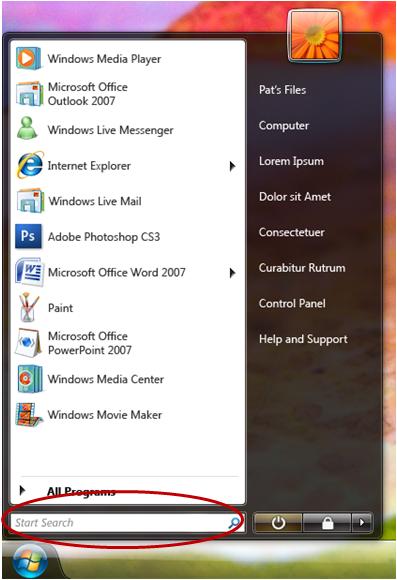
Windows 7 Start menu searchAn anonymous tipster pointed out to me in a recent (private) Windows feedback survey sent out by Microsoft, asked how often users use the Start menu search functionality, was a screenshot highlighting the aforementioned feature but not of Windows Vista and certainly not anything we’ve ever seen before.
The most logical explanation would be of course, this is a mockup of Windows 7.

If that is indeed the case, which is impossible to prove I might add, then we’re witnessing a number of changes from the Start menu in Vista today and even the Start menu from the leaked build of Windows 7 Milestone 1.

Notably the Start pearl/button/orb rests in a curved corner that is darker to the rest of the taskbar which is now considerably more transparent and white. And quite possibly the taskbar is “double height” by default. Some applications in the start menu also have a cascade button on its right, leading me to believe its some sort of extended menu, for what purpose I don’t know.

There are also a few things in this screenshot which stand for the wrong reasons. Some of the applications have icons which doesn’t match. For example, Outlook has the Windows Mail icon and PowerPoint has a XAML file icon. Then on the right side, the link buttons which are expected to be “Pictures, Music, Games etc” have been replaced by Lorem Ipsum filler text.

In case you were wondering, the screenshot has since been removed from the web server where the survey was hosted. It has been replaced with a more familiar screenshot from Windows Vista. Obviously, too late.

Microsoft’s “Tangram” project aims to “reset what people expect from the internet”

TangramIt’s not very often you find a job advertisement which doesn’t tantalize your curiosity, so it’s only to fair to take the following with a grain of salt. This Microsoft job posting for a “user experience designer” was published on the 23rd of February 2008.

The focus of the job description refers to a startup project inside Microsoft called Tangram. What they aim to achieve with the technology is intriguing at the least.

The Tangram team provides an opportunity to work on the engineering challenges of an Internet scale services technology coupled with 3D interactive experiences that have finally become possible due to ultrahigh resolution screens and high performance processors. We are changing what people expect from the Internet by delivering entirely new ways to see, interact with and use data of deep interest to consumers and business people. This is a project with high visibility in Microsoft. We are assembling a team of world class engineers with very strong analytical and technical skills. We are looking for people who can define the problem, come up with a solution, and implement it. End to end. Ship it in 6 months.

Tangram is a startup product team with the highest levels of visibility.

We aim to ship our alpha service and tool this year, and ship a revenue producing V1 in 2009, within a major Microsoft go to market. Tangram has the opportunity to change what people expect from the Internet by delivering entirely new ways to see, interact with and use data of deep interest to consumers and business people.

We are looking for a Senior user experience designer who has a burning passion for quality and simplicity. This is an opportunity to exploit ultrahigh resolution displays, interactive 3D, photorealism and immersion, and reset what people expect from the Internet.

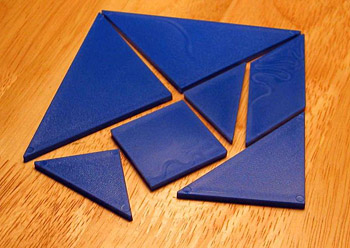
By no means a coincidence, a “Tangram” is actually an ancient Chinese puzzle game composed of 7 pieces of shaped objects called “tans” – including several triangles, a square and a parallelogram. The objective of the puzzle is to arrange the pieces, without overlap, to form an outline of familiar objects. It might sound limited, but the possibilities are in fact endless with the right creative mind.

To add more fuel to the fire, during the Microsoft “Mix n Mash” interview in December 2007, Bill Gates said the following:

Now, certain structured things are still hard to learn, like go to the Web and try and understand foreign aid. Because that’s kind of a numeric thing, the classification of (inaudible) is hard, the Web does not do that well today.

Now, some software breakthroughs in terms of letting you visualize data in rich ways and normalizing it as it comes from different sources, over the next three of four years that will happen.

In fact, most of my day today was in a visualization group where we’re talking about what breakthroughs are needed so that if you want to study a question like that, take economic flows, you want to understand this sub prime thing, you want to see the numbers, okay, what percentage of people bought what type of mortgage over what period of time, when does the interest rate go up, what does this mean, what portion of their income is it. If you really want to understand it more than just trivial text-type articles, there’s nothing out there today that lets you do that.

Coincidence? I think not. All we can do now is to keep an eye out for that alpha hopefully coming sometime this year. Otherwise I’m sure Scoble will let us know in advance, with a few tears for extra impact.