Category Archives: blog

Microsoft publishes detailed Vista SP1 “changelog”

Windows Vista SP1Leading up to next week’s public beta-test release of Windows Vista Service Pack 1 Release Candidate, Microsoft today has published a 17-page document outlining in fine detail exactly what difference SP1 makes to Vista.

Some of the contents has been shared in bits in the past, but this is so far the most comprehensive “changelog” we’ve ever seen and probably will see as the final version is not expected to differ much from the RC, with the exception of WGA modifications as described below. I’ve highlighted some of the most interesting changes which you may or may not already know.

This document describes many of the notable changes in Windows Vista SP1, with the exception of some updates to the Windows Genuine Advantage experience which we are still developing for our customers and will be released in a later build.

Hardware Ecosystem Support and Enhancements

  • Adds support for new UEFI (Unified Extensible Firmware Interface) industry standard PC firmware for 64-bit systems with functional parity with legacy BIOS firmware, which allows Windows Vista SP1 to install to GPT format disks, boot and resume from hibernate using UEFI firmware.
  • Adds support for x64 EFI network boot.
  • Adds support for the 64-bit version of MSDASQL, which acts as a “bridge” from OLEDB to a variety of ODBC drivers thus simplifying application migration from 32-bit platforms to 64-bit Windows Vista.
  • Adds support for Direct3D® 10.1, an update to Direct3D 10 that extends the API to support new hardware features, enabling 3D application and game developers to make more complete and efficient use of the upcoming generations of graphics hardware.
  • Adds support for exFAT, a new file system supporting larger overall capacity and larger files, which will be used in Flash memory storage and consumer devices.
  • Adds support for SD Advanced DMA (ADMA) on compliant SD standard host controllers. This new transfer mechanism, which is expected to be supported in SD controllers soon, will improve transfer performance and decrease CPU utilization.
  • Adds support for creating a single DVD media that boots on PCs with either BIOS or EFI.
  • Enhances support for high density drives by adding new icons and labels that will identify HD-DVD and Blu-ray Drives as high density drives.
  • Adds support to enable new types of Windows Media Center Extenders, such as digital televisions and networked DVD players, to connect to Windows Media Center PCs.
  • Enhances the MPEG-2 decoder to support content protection across a user accessible bus on Media Center systems configured with Digital Cable Tuner hardware. This also effectively enables higher levels of hardware decoder acceleration for commercial DVD playback on some hardware.
  • Enhances Netproj.exe to temporarily resize the desktop to accommodate custom projector resolutions when connecting to Windows Network Projectors.
Continue reading

Microsoft’s Ministry of Truth

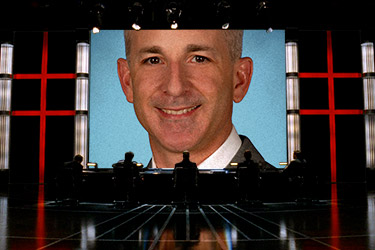
Steven SinofskyIf you thought the current state of Microsoft’s transparency is deafening, wait till they fill this role.

In this highly strategic role, the Director of Windows Client Disclosure will report to the CVP of Windows Product Management and is responsible for managing the full set of disclosures for the Windows Client Operating System business including defining the roadmap of disclosures, reviewing the core messages and driving buy-in across the organization. …

… The scope of this disclosure is focused on the Windows Operating System products including Windows XP, Windows Vista and Windows 7, but includes related products such as the Microsoft Desktop Optimization Pack (MDOP), Internet Explorer, and Media Technologies. …

… This includes coordination of messages between Windows Product Management and the Product Marketing and Communications team, the Windows Development Organization (WEX and COSD), the Windows Live Team, and the OEM team.

The Director for Windows Client Disclosure will play a key role in defining the communications agenda while grounding these disclosures in the technical and strategic realities of the Windows Operating System Business. This thought leader will also be responsible for making sure that there are zero surprises in our disclosure plans.

The Director for Windows Client Disclosure will be responsible for creating and communicating disclosure guidelines and processes across the Windows Team including Engineering, Marketing, Product Management, the sales force (working with Product Marketing), and operations.

The Director of Windows Client Disclosure is responsible for creating the roadmap for all disclosures that relate to the Windows Client Business. As a part of this, they are also responsible for making sure that all disclosures that relate to the Windows Client Business are made as part of a thoughtful process that drives clarity of message and orchestrated inclusion of key constituencies and audiences. To do this, the Director of Windows Client Disclosure must develop a process to collect and review all disclosures. …

Instead of just saying it like it is, it’s not hard to believe in the near future every blog post, press release, interview, podcast and video by Microsoft employees or involving them will have to be filtered to ensure it “drives clarity of message and orchestrated inclusion of key constituencies and audiences”.

Come to think of it, the Apple public relations people who took a bullet for Phil Schiller is perfect for the job!

Yahoo Messenger for Vista patched to work on X64

Update: Or Yahoo could release their official update to include X64 update a day after, that works too.

It took Yahoo almost 12 months to deliver a pre-beta build of its Yahoo Messenger for Windows Vista with hardly any features but worst of all, isn’t even compatible 64-bit Windows. In contrast, it took just a little over an hour for a hobby software developer to write a patch making it so.

I don’t know what sort of show they’re running over at Yahoo, but they seem to partying and spraying champagne over live electronics more than writing code by the looks of things.

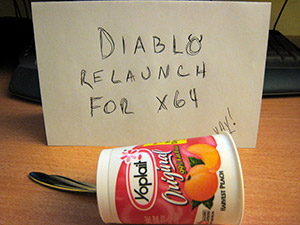
diablo_launch.jpgdiablo_relaunch.jpg
(Left) Photo from the official Yahoo launch party with sandwich and cookies.
(Right) Photo from the unofficial X64 launch party with yogurt.

Yahoo Messenger for Vista patched to work on X64Rafael Rivera Jr., who some users might be familiar with for his work patching Microsoft’s UXTheme library for Windows, took a good look at Yahoo Messenger’s executables to figure out why it did not work on X64.
First of all, the installer actually prevents the user from even progressing in the install if it detects its run on an X64 machine. To get around this problem, users can download the actual installation files from Yahoo itself. After the installation completes, if you try to run the application it will halt with an error immediately after the splash screen. As it turns out, it’s not as serious as it sounds.

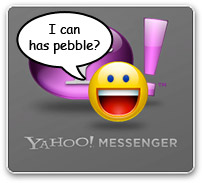
The root of the problem is that the application was compiled incorrectly. Rafael has the technical explanation, but to put it simply Windows throws a boulder at it when all it needs is a pebble. The fix basically patches the application so it tells Windows “I can has pebble?”, give or take some quantum mechanics.

In summary, to get Yahoo Messenger for Windows Vista (build 2007/11/30 420) working on your X64 machine:

  1. Download the manual installation executable from Yahoo
  2. Download Rafael’s patch
    (You can find the file in the folder “other-patches”)
  3. Extract the patch to the installation directory
    (default: %USERPROFILE%/AppData/Local/Yahoo!/Messenger for Vista)
  4. Run “Wizard.cmd” in the directory

So now I have to ask why 16 full-time Yahoo employees (counted from photos) couldn’t figure this out in twelve months. Writing X64-compatible applications should a be given in this day and age. And it’s not even like this is a major design problem preventing it to work, it’s just a stupid oversight ticking a checkbox or two when compiling the code.

If yesterday’s disappointing release wasn’t enough, now I’ve lost hope for the success of this project in general.

Thoughts on Internet Explorer 8 ‘announcement’

I really try to avoid copying and pasting content from other sources whenever possible, but in this case I don’t think I could have said it any better. Whilst you could argue a Mozilla developer commenting on Internet Explorer is obviously biased, but I think he cares about Internet Explorer as much as any Microsoft enthusiast would and shares the same doubts. I however have used a different picture to illustrate the point. Asa Dotzler says,

Dean, over at the IEBlog, introduces the world to the name of the next IE release, “Internet Explorer 8” and not much else.

He closes with “please don’t mistake silence for inaction.”

I don’t think people were mistaking silence for inaction, Dean, and talking down to them like that does your efforts no good service.

You all shipped IE 7 more than a year ago and presumably wrapped up major development on it 3 to 6 months before that, so I’ve got no doubt you all have been working on IE 8 for at least a year and a half. Your IE blog audience can figure that out too.

It’s not the lack of action that people are concerned about. It’s the lack of communication.

What your silence for the last 18 months of IE 8 development tells the Web developers of the world that you don’t give a shit what they’ve got to say about it.

If that’s they way Microsoft is going to continue doing business, then so be it, but don’t pretend that it’s something it isn’t. Don’t treat the people at your blog like children. They won’t appreciate that.

Yahoo Messenger for Vista finally launches

Yahoo Messenger for Windows VistaBetter late than never is overstated, what took so long?
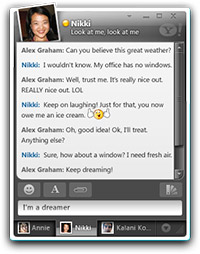
A preview version of exclusive Yahoo Messenger for Windows Vista is finally available today after almost 12 months of radio silence. Hard to believe this application was announced all the way back in January at CES 2007. During the same amount of time, Microsoft has delivered five versions (3 beta, 2 final) of Windows Live Messenger.

However above all, the new Yahoo Messenger is possibly the first real mainstream application to take advantage of Windows Presentation Foundation (WPF) and a number of Vista APIs for which I salute them for adopting new technology.

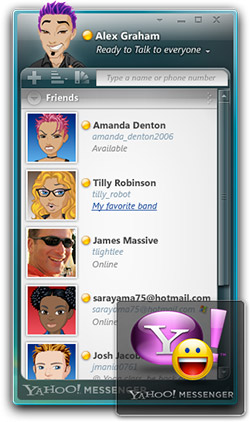
Comparing this preview release to the original conceptual design by Frog Design shows a number of subtle interface modifications but also a major disappointment.

Changes to the interface include the application windows are now encapsulated inside Windows Aero Glass frames. On one hand, this satisfies Microsoft’s Vista user experience guidelines which suggests all windows use the standard frame, but on the other seem rather quirky because the application has two harshly different styles of transparency.

The major disappointment is the lack of voice, video and sharing capabilities which were widely fanfared and demonstrated at CES. These features simply don’t exist in this version which leaves this client nothing more than just a fancy text instant messenger. The official blog states explains these features and more are coming in future releases which I hope isn’t on another 12-month cycle.

Yahoo Messenger for Windows VistaOne of the major roadblocks for WPF applications has been performance and it looks like this application suffers the same fate. On a dual-core system with a more than plentiful graphics card, this application can’t even render the emoticon popout opening and closing without obvious pauses. Generally when anything animates, CPU usage flies right up and performance hits rock bottom.


Along with the client is also a Sidebar gadget that allows for easy access to favorite buddies, a.k.a. people you want to stalk. Unfortunately I couldn’t get this gadget to even load, where it would just display a red cross like an image failed to load in Internet Explorer. I gave up after several tries.

For more than 12 month’s work, this application is an embarrassment. It looks great with a lot of fancy graphical wizardry, but there’s not much here. Unless they fix the performance issues and add back the features which were exciting, it is simply not worth switching to from Windows Live Messenger or even Yahoo Messenger 9.

Update: I’ve heard some indication that Yahoo Messenger and presumably WPF runs better in Vista SP1.

The “double-decker” Windows taskbar

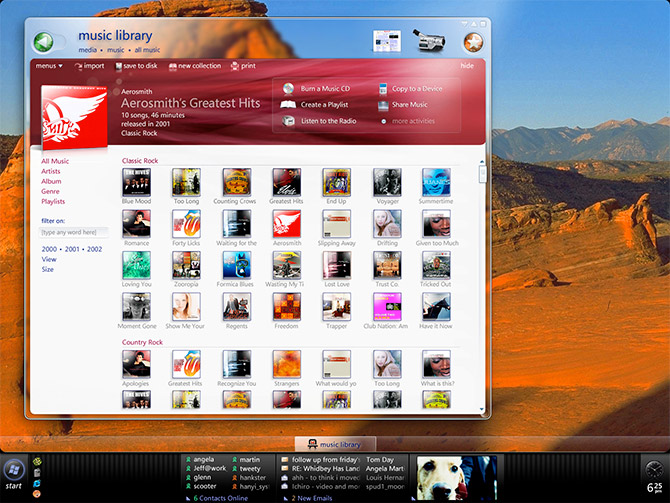
To the untrained eye, Ammunition’s Longhorn PC concepts last week might look nothing more than standard industrial design renders. But if you stared at it long enough as I did, you’d notice the Windows Longhorn screenshot on the monitor shows a taskbar is nothing like anything you’ve seen before. Since there’s no official name for it, I’ve dubbed it the “double-decker” taskbar.

I’ve finally been able to track down the screenshot in its original form.

The “double-decker” Windows taskbar

The story behind this is that during the Longhorn development process, Microsoft designers were toying with the idea of integrating what we know now as the Windows Sidebar into the taskbar itself.

To accommodate this, the taskbar became separated into two-levels where the application switcher was moved to a transparent row by itself on top. This freed up an incredible amount of screen real-estate on the taskbar itself which then could house Sidebar Tiles (as it was known at the time because each ‘gadget’ would dock as a rectangular tile).

The idea behind this was to avoid stealing another edge of the user’s valuable screen real-estate, which unfortunately is a sad reality for Vista Sidebar users today. Instead, it would have resulted in a fraction less vertical space but a more widescreen workspace which is more desirable.

The “double-decker” Windows taskbar

And it made sense to put it in the taskbar because it’s also where a lot of the notifications are already displayed. In fact, you could even replace most status icons in the notifications area with Tiles to provide a richer user experience. For example, instead of an Outlook icon you can have an Outlook tile which displays a list of unread emails. The Messenger icon can also be replaced by a contact list as well as minified versions of chat windows. If this had been realized, the taskbar would have become much more powerful and informative than it ever has been.

Unfortunately as anyone who’s familiar with Fitts’ Law would know that by moving UI objects away from the edges of a screen is essentially removing its infinite width. Fitt’s Law states because the cursor stays at the edge no matter how much further you move it, you can easily acquire these targets by moving the cursor in the general direction. Therefore by moving the application switcher away from the edge would have been drastically increased the effort required to toggle between applications. This was just one of the design problems that ultimately killed the idea.

Concepts like these are interesting because never before has Microsoft publically showed any interest in evolving the taskbar which remains a legacy of the innovation in Windows 95. Of course this now proves a lot more goes on behind the scenes that doesn’t get nearly enough as credit as it deserves.

Raiders of the Lost ArkSometimes I feel like Microsoft maintains a warehouse like the one in Raiders of the Lost Ark where it keeps all the abandoned ideas, which is unfortunate because outsiders can never understand what it takes to create the final product. As I’ve been told, thousands of concepts like these were created for Longhorn which resulted in Vista.

At the same time, people who look at these concepts can also be quick to criticize Vista. But the reality is, Vista is easily the highest quality user experience of Windows ever shipped. And that is the direct result of the same designers who put in years of work into Longhorn/Vista. Sure, some ideas had to be sacrificed but they’ve really pushed the boundaries of the Windows user experience and that’s just not for this release, but many releases to come.