Category Archives: blog

How to sync individual files with Live Mesh

Live Mesh is great if you want to sync entire folders across computers and devices but doesn’t allow you to sync individual files – it’s all or nothing. Or should I say it did, because you see where there’s a will, there’s a way. The way Rafael and I have come up with will allow individual files to be Meshed without any additional software or background processes. It’s not perfect but it works.

Please note the following tutorial involves modifying your file system and may result in catastrophic data loss or corruption. Now harden up and try this at home.

As a quick explanation, there is no getting around the current Live Mesh restriction of folders. So what we need to do is work around the problem locally. A feature of the NTFS file system is support for “hard links“. What “hard links” allow you to do is have multiple pointers to the same “physical” file in the file system. (Quick side note, this is different to symbolic links which does not work with Live Mesh).

What hard links means in reality is that you can have multiples of the same file in different location. So the first requirement is that you need to be using a NTFS file system. A consequence is that you can only create hard links for files on the same volume (ex. C:\).

Continue reading

AMD Fusion for gaming tool is the Windows “gaming mode” you’ve been waiting for

Amidst the AMD marketing spectacle announced today known as Fusion – and trust me your guess is as good as mine, AMD has also released a software download called the “AMD Fusion for gaming utility” as part of its wider campaign to promote the best possible PC gaming experience.
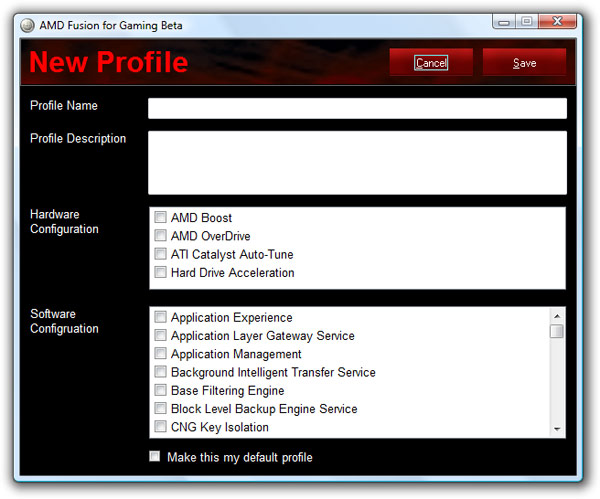
While it’s name is no help at all and the interface pretty much a gimmick, it is exactly what many Windows gamers have been asking for for years – a “gaming mode” that disables non-critical background services and optimizes the system for the best gaming performance. A good idea in theory but less applicable in practice.

The tool comes with three default presets, “Basic”, “Advanced” and “Expert” with respective aggressiveness towards how many optimizations are applied and background services disabled. For example, “Expert” disables Windows Updates whereas “Basic” does not. Of course you can make your own custom profiles and pick the particular services you wish to disable. After which activating and deactivating these profiles is as simple as clicking the shiny button and cue the sci-fi hyperspeed effect.

In addition, AMD has also bundled an interesting set of hardware optimizations including “AMD Boost”, “AMD OverDrive”, “ATI Catalyst Auto-Tune” and “Hard Drive Acceleration”. Before you begin to fantasize what magical secret sauce AMD is adding to make hardware faster, these are pretty generic optimizations with a flashier label. “Boost” for example disables power-saving features, “OverDrive” overclocks CPU, “Catalyst Auto-Tune” overclocks GPU and “Hard Drive Acceleration” enables Windows disk caching.

The application is, as expected, exclusive to AMD customers only via hardware detection. I’m sure it won’t take long before someone *cough*Rafael*cough* figures out how to remove that detection so all gamers can try out this handy tool. Update 2: Download the patched EXE to run on your non-AMD machines.

Speaking of which I’m going to take it for a test drive but I don’t expect much out of it. Will update with thoughts later. Update: At least on a med-high-end machine, these optimizations does not seem to make any substantial differences.

Microsoft trademarks “Songsmith” for MySong automatic vocal accompaniment software

This might just be the quickest research project to commercial application transition from Microsoft Research yet.
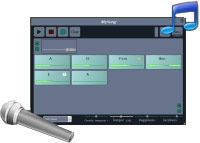
In late February earlier this year I wrote about a cool Microsoft Research project called “MySong” made in collaboration with the University of Washington full of gifted computer science students. Now seven months later, Microsoft has just filed a trademark application for “Songsmith” for “computer programs for generating background music to accompany singers” – exactly what MySong did.

[flv:MySongCHI2008.flv 630 420]

For those who have forgotten what MySong was about, it was a software application where it autonomously generates a dynamic background melody to accompany any vocal singing you throw at it. Whilst it was still not as dynamic as a real accompanist, but still a good mile ahead of other commercial alternatives on the market today. Oh and it saves you the embarrassment for any real musicians to have to accompany you and your attempt at “SexyBack”.

So far there’s no other evidence as to how Microsoft intends to market “Songsmith”, whether as a freebie MSR download or a cheap casual music program which I’m sure will be quite popular with teenagers either way. Even now I can already imagine the many screeching YouTube videos.

Windows Scenic: Windows 7’s Ribbon-based UI platform

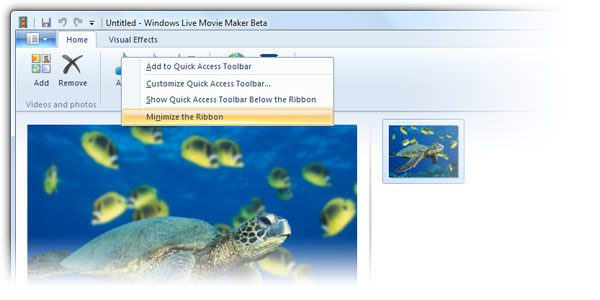
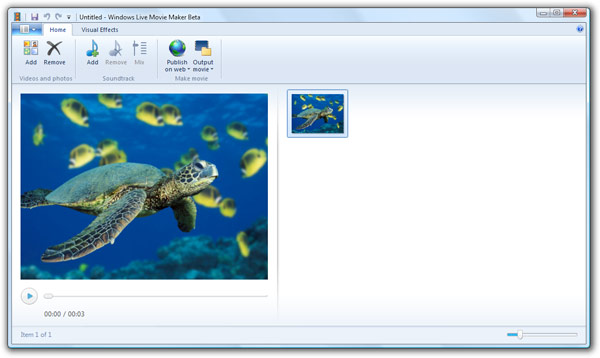
It looks like the much anticipated new user-interface platform for Windows 7 and Windows Live Wave 3 applications is being called “Windows Scenic”, if the recently available Windows Live Wave 3 Movie Maker and leaked screenshot of Windows 7’s Paint application is any indication. They are both built with one and the same UI framework.

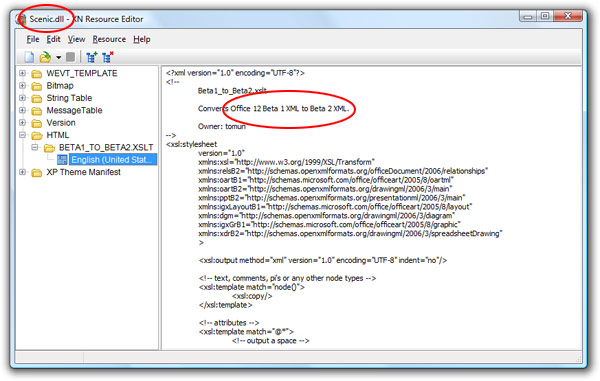
Several months ago there were indications Microsoft was working on an Office 2007 Ribbon-inspired interface for Windows 7 which at the time sounded bizarre and is still today. How it is implemented in “Scenic” is literally stripping the Ribbon out of Office. In fact so literal Scenic’s DLLs include resources from Office 2007 Beta 2 and the existence of a “Ribbon menu” as noted below,


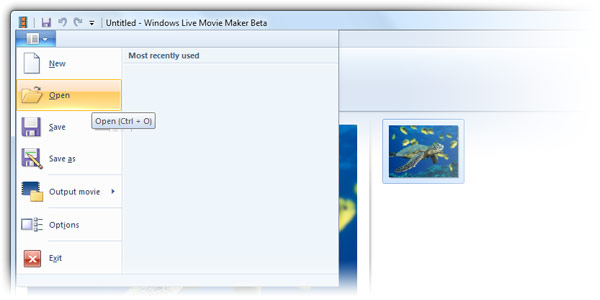
However, it’s not exactly the same either. The major difference between Ribbon and Scenic being the lack of an Orb in Scenic who’s file menu is instead a button next to the first tab that works identical otherwise.

Now some quick thoughts about Scenic. Having a native Ribbon interface library in Windows is probably a good idea to reduce the number of not-quite-right third-party Ribbon implementations that’s out there, delivering more consistent experiences should developers choose to use such an UI. In addition, the Ribbon also delivers a few extra useful UI controls like divided and separated buttons in the toolbar as well as preview galleries to select between themes and designs.

On the other hand, do applications like Paint and Live Movie Maker really need a Ribbon? Office 2007 only had it because it had a bazillion functions. How many does Paint have? For example in Live Movie Maker, there’s only two extra ‘blocks’ in the “Visual Effects” tab which could have fit perfectly in a single menu without a tab. It feels a little like they’re doing it just because they can and that might just be the Achilles heel.

New Zune promo video is ad worthy

[flv:zune_attract.flv 368 480]

Found this on the new Zune website’s frontpage. It’s a promotional video showing off the new Zune experience in just under 90 seconds featuring pretty slick graphics, a groovy soundtrack and explains all the cool (new) features of the Zune pretty well. Plus some sort of trippy origami thing going on in the back too. If you ask me, perfect for an TV ad, with some obvious production changes of course. For example, I don’t think anyone has a 6:19 ratio television.

Side note, does anyone know what the song is called? Thanks to Rafael for pointing out the song is “Wanna be a Star” by Walter Meego as flashed in the video at about 12 seconds in.

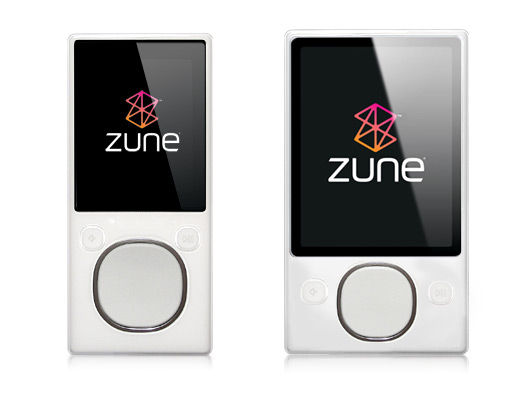
White Zunes lurking in new Zune 3.0 software update

Is it an iPod? Is it a cheap Chinese iPod knockoff? No, it’s an unannounced white Zune, in both flash (left) and hard drive (right) models. Whilst not apparent in the images above, the hard drive model also comes in both silver and black backings. Hiding in the latest Zune version 3.0 software release resource files, these could be either default placeholder images or a good indication of what’s coming down the road. However knowing how well the Zune team treats themselves, it could be just another exclusive Zune-team present.