 The ability to run decade-old applications on the newest releases of Windows has almost become a rite of passage. Most people would agree that software backwards compatibility on Windows is easily one of the important factors for its success. However with each release, Microsoft digs itself deeper and deeper into this pit of support as the breadth and depth of software grows exponentially. So much so some predict it will eventually ruin Windows, if it hasn’t already.
A recently published patent application, “Environment For Executing Legacy Applications On A Native Operating System” for those of you playing at home, filed in April of 2007 by Microsoft’s Hoi Vo and Samer Arafeh (who works on the Windows kernel) reveals some details of how they might (and emphasis on might because patents are just words on a piece of paper) accommodate and dramatically improve software compatibility in future releases of Windows.
As described in the patent, the problem of legacy applications support lies in binaries (DLLs and EXEs). As operating systems are updated, system binaries change. Older system calls, callbacks and exceptions may not exist at all in the new operating system, may exist to some degree or may generate alternate responses. Any of which is likely to wreck havok on legacy applications which depend on these binaries.
Currently there are two conventional solutions to the problem. Each with their respective advantages and disadvantages.
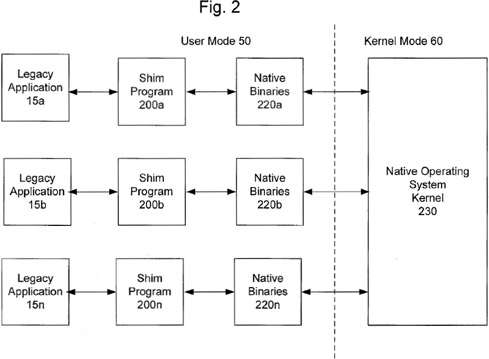
The first employs the use of “shims”. Metaphorically speaking, it’s basically sticky tape around the edges to make sure things don’t fall out. Technically, it’s a custom-written patch that is applied on-the-fly when legacy applications are loaded and will sit in between the legacy application and the native system binaries. Reportedly Microsoft has written thousands of shims for Windows Vista, and are still writing. The upside is that shims are relatively easy to implement, but having to generate shims on a per application-by-application basis means it doesn’t scale well at all.
The second solution takes advantage virtualization technology. By hosting a legacy OS virtual machine, legacy applications won’t any know any better. Virtualization offers full application support but at a hefty performance cost. Hardware support is also primitive, making it difficult to share resources like 3D graphics for example. It also requires users to be able to install each version of the legacy operating systems.
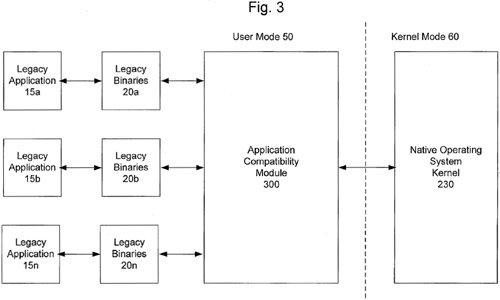
The proposed solution in some ways takes the best bits of both. It works first by detecting if the application was written for the native operating system. If not, it will load the application with its respective legacy system binaries. To accommodate the difference in system calls between the legacy binaries and native kernel, an Application Compatibility Module is placed in between to act as a translator for these calls. In certain cases where a comparative native system calls may not exist at all, the ACM could also be smart enough to provide the same functionality as the missing system call.
Hypothetically speaking, if the system detected an XP application running on Windows 9, it would load the XP system binaries (ex. system32_xp) and then a “XP-to-Win9” compatibility module.
The benefit of this solution is it offers much broader application compatibility with relatively low investment on Microsoft’s behalf on the scale of per-application – they will only have to write a ACM for each legacy system they wish to support. Legacy applications will also be able to take full advantage of the system resources as a native application, because there is no emulation involved.
Notable Windows on Windows – the compatibility system used to provide 16-bit on 32-bit systems support and 32-bit on 64-bit systems support uses a similar concept.
One of the biggest gripes from most Windows enthusiasts has been the bloat legacy compatibility forces into Windows. Whilst this patent doesn’t specifically mention so, I presume such ACMs are modular and can be installed and removed on demand. For example, if you need to run Windows Vista applications in future versions of Windows, you will only download and install the Vista ACM Pack (with Vista binaries) for that operating system. Those who do not require legacy support will then be not required to install any ACMs.
Thinking about it, it could become a business model to sell ACMs separately to Windows – reducing the overall cost of Windows and charging a tiered price for legacy support. A cheaper and less bloated Windows, wouldn’t that be nice.

 It appears the roadblock preventing