Category Archives: blog

Neowin.net forum member posts first review of Windows 7 Milestone 1 Build 6.1.6519.1

Windows SevenLooks like it didn’t take long for the first external build of Windows 7 to be leaked on to the interwebs. Black fumes were reported escaping Steven Sinofsky’s office earlier this morning after news Microsoft has delivered a Milestone 1 build of the next version of Windows to OEMs spread like wildfire in a dry grassy field on a hot summer’s day.

A member named “kenipnet” on Neowin.net’s forums claims to have and installed this very build on his own desktop and laptop machines, and posted this short review on Neowin. For unknown reasons, it was later deleted by the poster, but fortunately the website administrator “Neobond” has republished a cache version of the original post for all but Sinofsky to see. Of course there’s no way to prove this is true, but the facts appear consistent with ‘other reports’ of what the build contains. Take it with a grain of salt and a cup of tea, donuts sold separately.

So here we’re at it, again 😛

Over the weekend I finally managed to play with the build…. but disappointed.

One my primary machine, it asked for my SATA driver (never happened when installing Vista, as my drives were set as IDE in BIOS). After adding the driver from my USB thumb drive it would finally install. It didn’t boot after first restart, however.

On my laptop it installed perfectly, but with no driver support for the video card. After numerous tries I gave up in the end, so Aero is now left in the dark.

Oh well, so there’s nothing to show.

The build is 6.1.6519.

The GUI, as much of you have guessed, is very much like Vista. I don’t know if once the right video card driver is in place whether there will be flashy stuffs to surprise me. The system is very responsive, using barely 480MB of memory after boot.

Gadgets are now integrated into explorer. You can right click on desktop and select “Add Gadget” or “Hide Gadget”. There is a new gadget called “Windows Media Center” that displays now playing information from the WMC. On the same menu, “Display” is added above “Personalization” which gives you direct access to display DPI settings. The page is much more polished than the one in Vista.

The start menu features a pin besides each item. Clicking on it toggles pinning/unpinning the item. Search in explorer is now states where you search within (usually being within the folder, as in Vista). You can now, however, adjust the size of the search box.

XAML fonts, called the “Composite Fonts” are now added to the font folder. Perhaps WPF will be much more prominent in this release. It’s disappointing that I don’t have Aero running, or otherwise there might be some interesting stuffs to see.

A new application is added, dubbed the “XPS Viewer”, no surprises, either.

Then finally, something interesting came up: the feedback tool. The feedback tool lists the “pillars” of Win 7. You can see that Microsoft is aiming to fine tune this release as the case in XP rather than technological advancement as in 2K. highlights include”network aware”, with improved connection tools and detections. It will have the ability to detect which network you’re in and switch your settings and devices accordingly; With Live account, you can carry your IE settings and favorites with you; Gadget data caching; New Calculator, Paint, and Wordpad using WPF; install to desktop in 10 mins with only 1 reboot; instant streaming; better battery mileage, etc. All descriptions are scenario-based, so what will actually turn up is still yet to know.

Oh.. how could I miss this. A new boot screen does show up, finally. A full screen Vista-logon screen like boot screen with a beam scrolling across the whole screen near the bottom. Looks nice but reminds me of Win9x (well since XP we’ve been in the “dark”, so surprised to see such a bright boot screen)!

I for one simply cannot wait for the new calculator. As long as no one gets into unrealistic release date guesstimations again, it’s all good fun. Although I don’t agree with what the poster described as a “disappointment”, because there shouldn’t be any expectations. Let’s not make the same mistake twice.
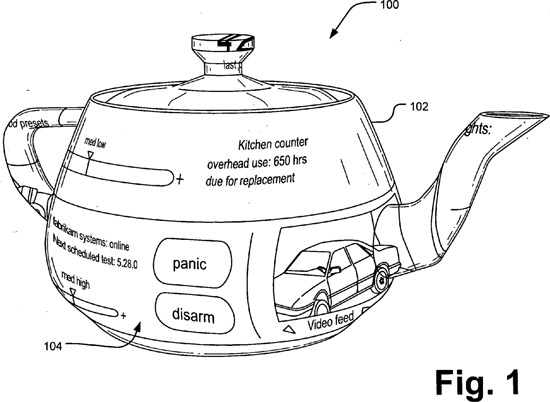
Microsoft patents teapot user interface – may be critical to Windows 7 user experience

United States Patent Application 20080013860 “Creation of three-dimensional user interface” was filed by Microsoft on July 14, 2006. I believe this is somehow related to Windows 7, only if I can figure out how it works…

teapotui.jpg

A three-dimensional (3-D) user interface (UI) creation system maps a two-dimensional (2-D), interactive UI to an 3-D object template in a 3-D scene. Once mapped, the 2-D UI functions as a simple user interface while appearing as a skin to the 3-D object. A 3-D UI creation tool applies image resources of a 2-D UI template to a 3-D wire frame template to create a 3-D UI. The system provides for rapid implementation of a 3-D UI without need for understanding a 3-D space or 3-D authoring software. The process includes preparing a 2-D UI, loading a 3-D scene of 3-D objects, and mapping the 2-D UI to a 3-D object template in the 3-D scene. A scheme file provides a specification for recreating the 3-D scene in a runtime module whereby the 3-D scene functions as a 3-D UI system, allowing interaction via a user input system.

Anyone who comes up with the best explanation will be awarded a 2D copy of the M1 build of Windows 7.

Update: Since you’re all too smart and I’m so generous, you can all download a copy of Windows 7 M1 here (1.5GB ISO).

Touching the Dell Latitude XT Tablet PC (review)

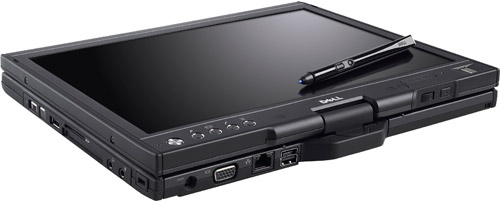
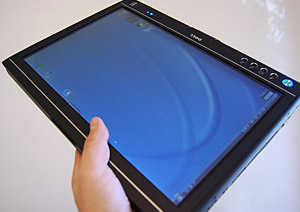
Dell Latitude XT Tablet PC reviewDell’s Tablet PC is finally here. After years of wild rumoring and enthusiastic anticipation, the Latitude XT is Dell’s first bet in the ever-bleak Tablet PC industry. Whilst Dell didn’t deliver what everyone have hoped for – the cheapest tablet PC – they did however design one featured packed notebook with numerous innovative ideas and engineering worthy of at least some credit.
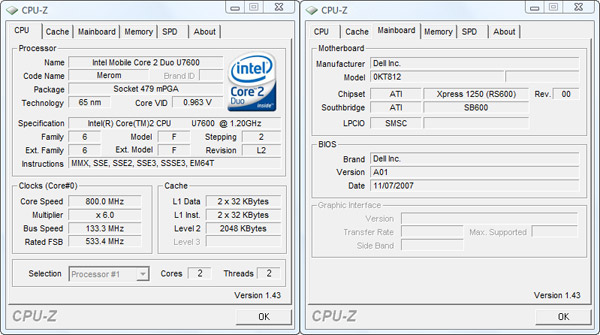
I’m lucky enough to be one of the first to get their dirty hands on this very popular machine (amongst journalists at least). Whilst I would have preferred to review this after university started, but it had to be an on-the-minute decision or I might have not had the chance again for a very long time. Sorry Mossberg, you’ll have to wait until I’m done.

cpuz.jpg

This particular model has in it:

  • CPU: Intel Core 2 Duo Ultra Low Voltage U7600 (1.2GHz)
  • Memory: 2GB (2x1GB) DDR2-533Mhz
  • Hard disk: 32GB SanDisk Solid State Drive UATA 5000
  • Graphics: ATI Radeon X1250 UMA Graphics (integrated)
  • Display: 12.1-inch WXGA LED back-lit display (1280×800)
  • Optical: D-Bay plus 24X CD-RW/DVD
  • Input: N-Trig Native Dual Mode (Electrostatic pen & capacitative multi-touch)
  • Wireless: Dell Wireless 1505 Draft 802.11n
  • WWAN: Dell Wireless 5520 Mobile Broadband (3G HSDPA)
  • Ethernet: Broadcom NetXtreme 57xx 10/100/1000 Gigabit Ethernet
  • Bluetooth: Dell Wireless 360 Bluetooth Module
  • Audio: SigmaTel HD Audio
  • Battery: Primary 6-cell 42W/Hr Li-ion battery. Secondary 45W/Hr Li-ion slice
  • Connectors: 3xUSB, Firewire IEEE01394, SD card slot, ExpressCard, VGA, RJ-45 ethernet, microphone, headphone
  • Speakers: Integrated mono speaker
  • Accessories: Integrated microphone array, UPEK fingerprint reader, leather portfolio carrying case
Dell Latitude XT

On Dell’s site, a similarly customized model would cost about US$3500. The SSD hard disk alone is a $600 extra. When asked why such a high introduction price, Dell insisted Latitude is a business-oriented range of notebooks and so these prices reflect the quality of business-grade computers including support, security and customer care. Which means until Dell moves the tablet out of the Latitude range, don’t expect the prices to drop to any ‘consumer’ levels.

Continue reading

Microsoft reintroduces Plus! for Windows Vista

Update: Amazon has since leaked a slightly different version of the Plus! pack for Windows Vista description. They estimate March 31, 2008.

This filled-to-bursting treasure chest of classic and new favorites is certain to delight, dazzle, and entertain your entire family for hours on end. The Bicycle Card Collection contains 12 classic cards games, from American traditions like Hearts, Crazy 8’s and Gin Rummy, to European favorites Schafkopf and Skat. The Puzzle Collection regroups 10 different games that were designed by Alexei Pajitnov the famous creator of Tetris -promising hours & hours of fun with those clever games that’ll strain your brain! GamePack even includes a trial version only of Pandora’s Box, an incredible reflection game from the devilish brain of Alexei Pajitnov and nominated as the Best Puzzle Game in 1999 at E3. Microsoft Plus GamePack is a must-have game collection for anyone who loves card games and puzzles!

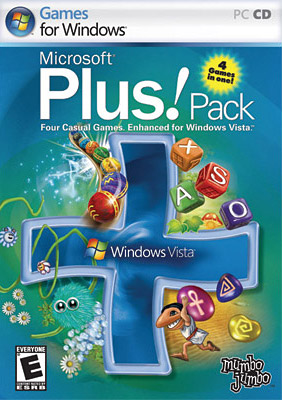
Microsoft Windows Vista Plus Pack (PC)The first edition of Microsoft Plus! was codenamed frosting, like frosting on a cake. (Insert Portal cake joke). When Microsoft introduced Ultimate Extras for Windows Vista, everyone naturally assumed this was the replacement for Plus! delivered digitally instead of a retail product, but that might turn out to be false.

The eagle-eye enthusiasts at WinBeta (and also credit to the Neowin.net forums) have spotted an interesting product listed in Future Shop’s, a leading technology retailer in Canada, catalog. “Microsoft Windows Vista Plus Pack (PC)“.

Whilst the name could have been misleading, the packaging boxart is hard to disprove. Microsoft’s reviving the Plus! brand for Windows Vista, but limited only to games.

For your information, don’t look too much into the product description which is copy and pasted from the generic Windows Vista Home Premium marketing copy, noting the differences between Home Basic and Premium.

Whereas previous Plus! packs included a range of screensavers, themes, games and applications, this is only a set of four casual games developed Mumbo Jumbo as indicated on the boxart. One of the games I can easily identify is “Luxor” in the top left. The bottom right one might be “Ra”. The bottom left might be an adventure game, and top right a word/puzzle game.

These games, separately, have been available for retail for quite some time. One user who claims to have played two of these at the Windows Vista launch event in January 2007, unaware they were part of this pack, said they were “pretty cool” casual games.

According to Future Shop, these will retail on Friday, February 15, 2008 for $39.99. Cross our fingers, maybe these will even be Ultimate Extras.

Update: Rafael has contacted Mumbo Jumbo for an official comment, and he has their reply on his blog. Funny they should mention “infancy stage”, so I guess the product boxart just generated by itself huh.

John Connor stumbles into Windows development lab?

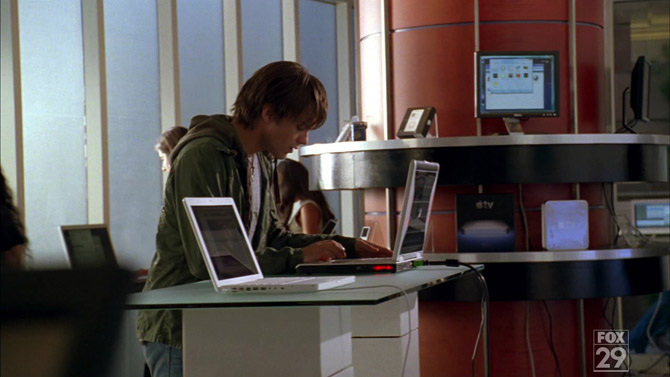
We all know product placement in science-fiction television shows can sometimes get out of hand. But today’s episode of “Terminator: The Sarah Connor Chronicles” has left me puzzled over what might have been a placement for Windows Vista. I say “might have been” because it is definitely not the Windows Vista we’ve all seen and some love to hate. It was like if they shot the scene inside Microsoft’s Windows development labs. I didn’t know John Connor was such a beta addict.

Rafael Rivera has put a gallery of high-definition screencaps, here are some of the most interesting ones in order they appear in the episode. For those of you playing at home, it begins at about 15min43sec and lasts about 90 seconds.

tsc_1.jpg

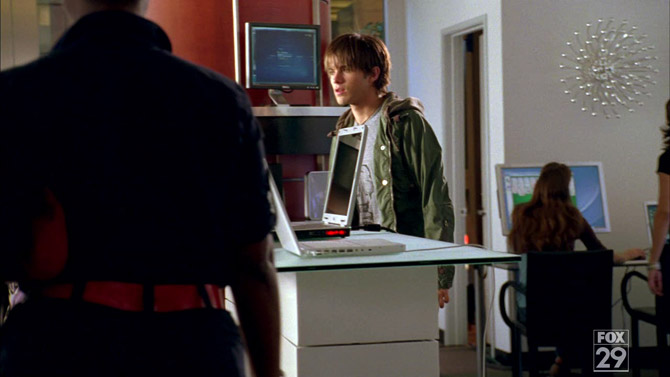
Without giving too much away, John Connor (lead character from the Terminator franchise) is walking into a computer store inside a shopping mall, having just time traveled from 1999 to 2007. Fortunately for John, he missed the release of Windows Millennium Edition. Note how Solitaire is clearly the best way to test out a computer before you purchase it. Media Center running on the PC on the top shelf.

tsc_21.jpg

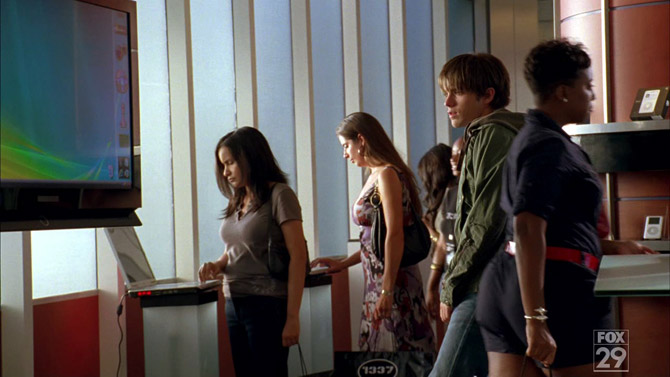
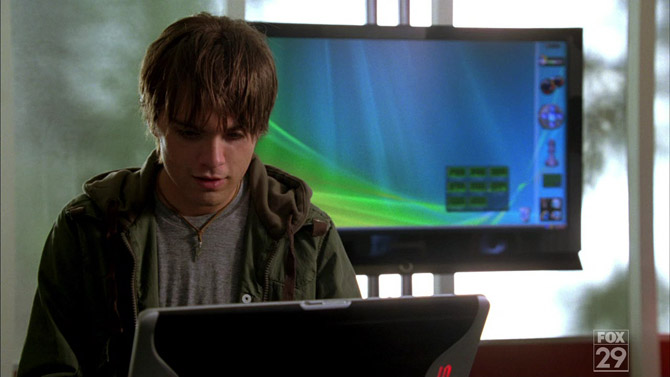
John sees Windows Vista for the first time, falls in love. Woman with “1337” bag in the background.

tsc_2.jpg

Having time traveled also means John missed the introduction of the Apple iPod, AppleTV and new MacBooks. But like the loyal Microsoft fanboy he is, he doesn’t pay much attention to them.

tsc_3.jpg

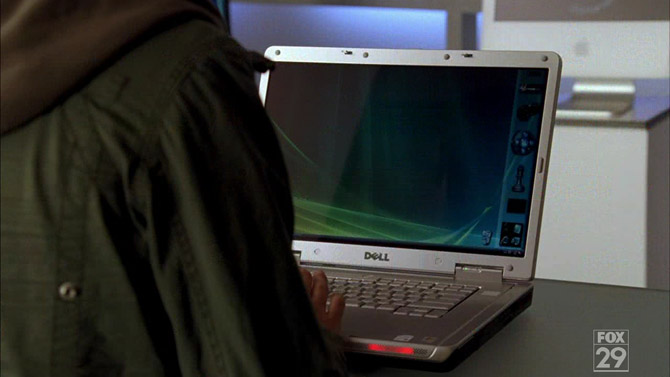
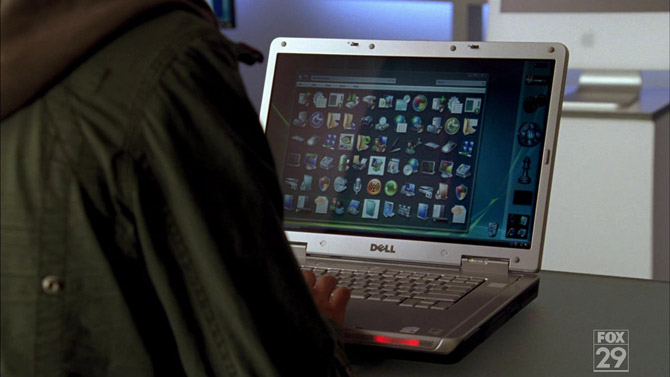
John starts playing with Dell laptop, which happens to be connected to the huge LCD TV behind him.

tsc_4.jpg

John plays with his first Sidebar gadget, which happens to be a system performance multi-monitor of some sort displaying eight graphs. Note how the Sidebar has a white translucent background with a border (instead of the black fade in Vista RTM). The other gadgets from top to bottom include a hard drive monitor, the default CPU meter, a prototype Windows Media Player gadget from 2005, a chess piece and a quick launch tile.

tsc_5.jpg

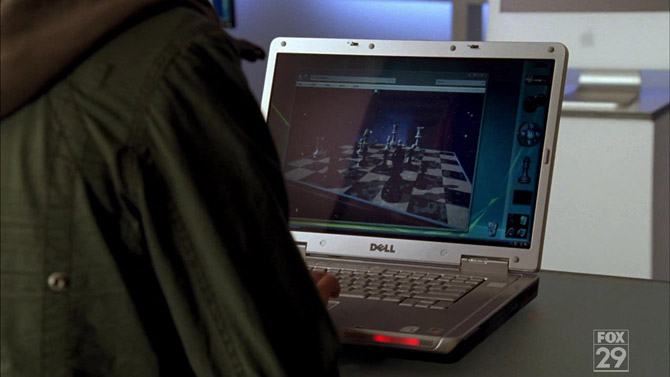
Next he clicks on the Chess icon and a Chess game application fades in from the right. It looks very different to the one in Windows Vista – darker shadows, more realistic chess pieces and board and it also has a space background with stars and galaxies.

tsc_6.jpg

Somehow then John opens the control panel, or if you can still call it that. The window is filled with all the icons from the Vista classic control panel but without text labels. The background is translucent with a black overlay. Norton LiveUpdate icon also makes a cameo appearance.

tsc_7.jpg

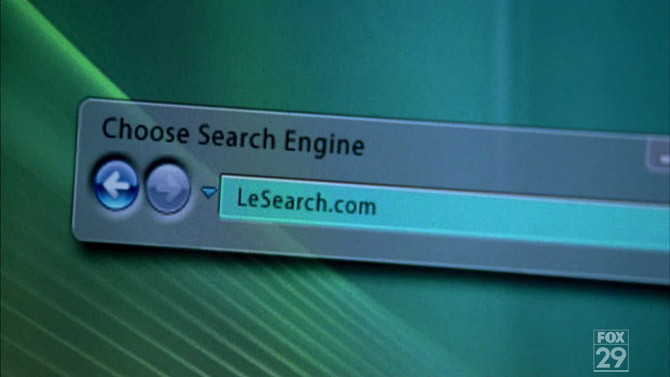
John then discovers a search box with an Explorer style back and forward button. The default search engine is LeSearch.com. Watch out Google, the French are coming.

tsc_8.jpg

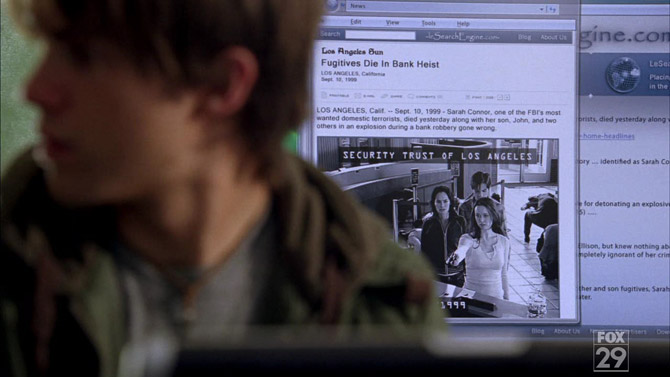
Naturally John starts searching about his past and finds articles about his “death”. What appears to be a browser window appears in the background. It shows only a back and forward button, an address bar and a standard toolbar.

tsc_9.jpg

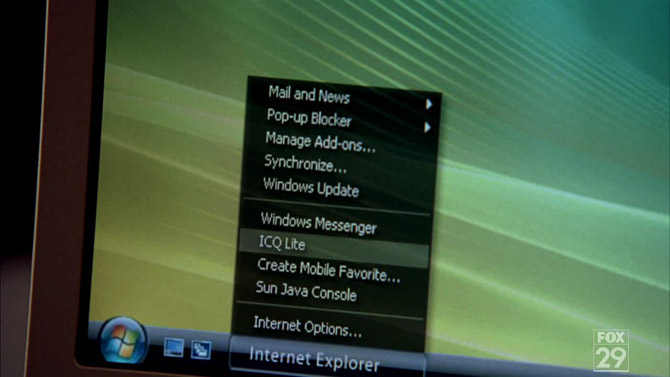
Shortly after a sales person disturb John and tells him that he was showing everyone what he was looking at on the big screen. Offers to help him clear the browser history. Somehow she opens a menu for Internet Explorer in the taskbar, which seems to have some of the options you would find inside the application’s toolbar.

tsc_10.jpg

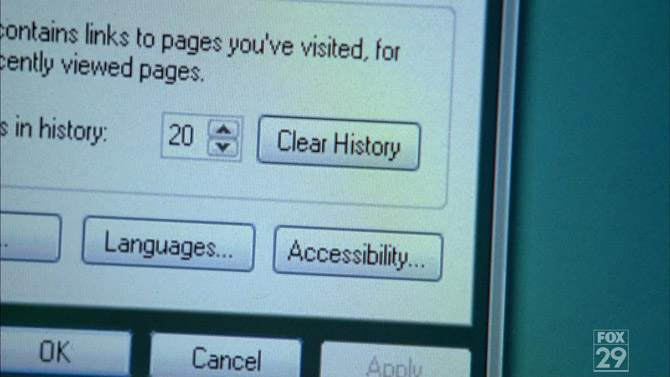
In the dialog that opens, she clicks on “Clear History”. Note how the buttons are styled like Windows XP buttons, even though this is inside Windows Vista with the glass frame and Aurora background. Scene ends.

Whilst it is true custom operating systems in TV shows and movies are nothing more than just optimizing what appears on screen so viewers can follow along more easily, but this seems a little more elaborate than most. I mean that Windows Media Player gadget was never released to the public, so how did that get there? I can’t help thinking Microsoft knew about this production either through licensing or a product placement deal, in which case, what is this?

Interview with Don Lindsay, Microsoft Live Labs

Microsoft Live Labs
Photo credit Steve Clayton

If you think of all the innovative, cool and realistic technologies Microsoft has shown to the public in the past year or two, Photosynth would easily top that list. That’s pretty amazing for a research group that’s only been existent in Microsoft for just two years. Anyone who follows this blog knows just how excited I am about Photosynth and Seadragon.

I got in touch with Don Lindsay, director for design at Microsoft Live Labs to find out a little about the history and what is going on behind the scenes. Don also shares a little about his interesting past and contributions to the next version of Windows.

Long: What is Microsoft Live Labs and when was it formed? How does it compare to Microsoft Research?

Don: Microsoft Live Labs is an applied research organization focused on the incubation of innovative, internet-centric technologies to accelerate the evolution of Microsoft’s internet products and services. We collaborate with other groups at Microsoft and with external industry and academic research labs to fulfill our mission. The creation of Live Labs was announced in January, 2006.

Whereas Microsoft Research primarily focuses on pure or experimental research, releasing technology previews to the community for feedback is not necessarily an end-goal of their efforts. Essentially Live Labs acts as the middle ground between Microsoft product groups and Microsoft Research.

Live Labs does collaborate with Microsoft Research on a number of levels, and we have incorporated their research into Live Labs technology previews such as Photosynth.

Continue reading